

.avif)


Lead capture is the process of collecting contact details and context from someone who has shown interest in your business, and storing them as a record your team can act on. It happens wherever you meet prospects, from website forms and landing pages to trade show booths and field conversations. Lead generation creates the interest; lead capture is what keeps it from evaporating.
Key Takeaways (TL;DR)
- Lead capture covers far more than a website form. Chat, phone, webinars, QR codes, and badge scanning at events all count.
- Lead capture, lead generation, and lead retrieval are three different things, and confusing them is how teams buy the wrong tool.
- Slow follow-up wastes leads you already paid for, and most companies are slower than they think.
- Give in-person leads the same rigor you give web leads. Booth conversations carry buying context a form never asks for, and they are the easiest to lose on the way to the CRM.
- If you want to maximize the leads you actually capture, ask for less. On the web that means a shorter form with enrichment filling the gaps. In person it means letting a badge or card scan do the data entry instead of a rep typing it up later.
- Say what you collect, and why, at the point you collect it. A plain line on the form, or a sentence at the booth, is exactly what the CCPA asks for and the starting point for the GDPR and CAN-SPAM.
What is lead capture?
Lead capture is how an interested person becomes a record your team can act on. You collect their contact details, add whatever context the moment gave you, and store both somewhere sales can work them. That definition reaches well beyond the website form: G2's software category counts web forms, landing pages, chat and messaging tools, phone calls, webinars, QR codes, badge and business-card scanning, and website visitor identification as lead capture.
Most guides treat the subject as a website activity and stop there, which is the half where the tooling is mature and the record generally gets created. In-person capture is the half where the record often never exists at all. A booth chat, a conference introduction, or a site visit is a lead capture moment whether or not anyone writes it down.
Why lead capture matters
Your team cannot follow up on interest nobody wrote down, trace where it came from, or count it, which is why capture quality sets a ceiling on everything downstream. Your CRM is only as good as what reached it, and a personalized follow-up can only draw on context somebody recorded. Creating demand is the expensive half of the job; keeping what it produces is the cheap half.
Lead capture vs lead generation vs event lead capture vs lead retrieval
Four terms get used interchangeably in this category, and the mix-up is expensive: it is how teams end up renting a scanner when they needed an app, or buying software when the real problem sat upstream. It is worth two minutes to separate them.
Lead generation creates the interest, and lead capture records who showed it. Event lead capture is the in-person version of that recording step, run on an app the exhibiting company buys and takes to every show. Lead retrieval is the narrowest case of all, rented from the organizer for a single event. The CRM, the fifth row below, is where the captured lead finally gets worked.
| Term | What it covers | Example |
|---|---|---|
| Lead generation | Creating interest and demand | A webinar campaign that draws 400 registrations |
| Lead capture | Recording who showed interest, with context, in any channel | A website form writing a new lead into the CRM |
| Event lead capture | Capturing in person, in the exhibitor’s own system, so the records and the CRM sync stay with you | Scanning a badge at a booth and adding notes from the conversation |
| Lead retrieval | Badge scans through the organizer’s system, one show at a time | Renting the show’s scanner to collect attendee records |
| CRM | The system of record where captured leads get worked | Salesforce or HubSpot, holding the lead after capture |
Event lead capture against traditional lead retrieval is the comparison that costs real money. Renting the organizer's scanner is fine if you exhibit once or twice a year, especially where the rental is bundled into the booth package. Across a calendar of shows it means a different tool, a different export, and a different learning curve at every venue, which is why exhibitors end up buying an app of their own. For the rented side in detail, see our guide to what lead retrieval is.
How lead capture works: from first touch to CRM
A lead capture workflow runs five steps, and they hold whether the lead arrives through a form or a handshake. The depth of each step changes, though: online, capture is self-service and qualification is limited to what a visitor will type, while in person a rep does the capturing and can qualify much further, at the cost of scale.
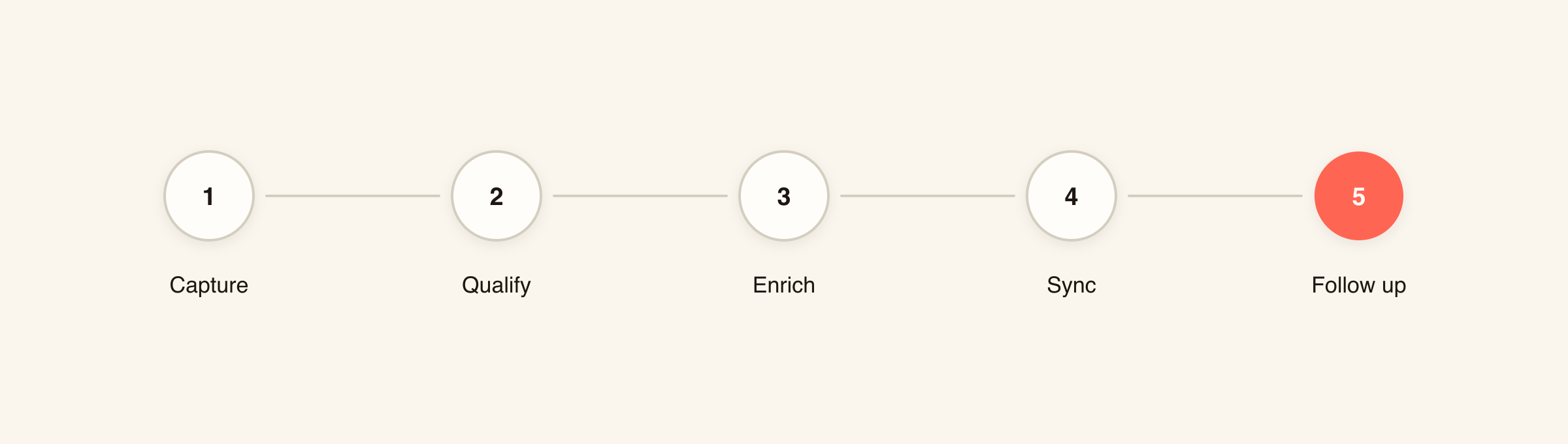
- Capture. Record the details and the context of the interest at the moment it happens. Online that is a form submission or a chat exchange; in person it is a badge scan, a card scan, or a QR share.
- Qualify. Add the notes, tags, or answers that tell sales whether and how to follow up. A top-of-funnel form realistically gets you one extra question, a demo request can carry several because the visitor already wants the meeting, and a ten-minute booth conversation can carry budget, timing, and the incumbent vendor. Teams that score leads do it here.
- Enrich (where the gaps matter). Enrichment is the trade that buys you a short form: collect a work email, and let a data provider fill in role, company size, and verified contact details afterward. It costs per record and coverage thins out for small companies, so check match rates on your own list first.
- Sync and route. Move the record into the CRM and give it an owner as part of the same step. An unowned record inherits the queue's default, which in most teams means nobody picks it up.
- Follow up. Reach out while the interest is fresh, using the context the first four steps preserved.
Speed to lead: how fast you follow up
Speed to lead is the gap between a prospect showing interest and someone getting back to them, and it is where captured leads most often die. In a 2011 Harvard Business Review study, researchers audited 2,241 US companies by submitting a web-generated test lead to each one. Only 37% answered within an hour, 23% never answered at all, and among those that answered inside 30 days the average took 42 hours.
A separate study by the same authors looked at 1.25 million leads across 42 US companies and found that firms attempting contact within an hour were nearly seven times as likely to qualify a lead as those that waited an hour longer. Qualifying there means a meaningful conversation with a key decision maker, which is a higher bar than a reply.
Read the multiple as direction, not a benchmark: both studies measured inbound web leads, only 13 of the 42 firms in the second were B2B, and one co-author was chairman and CEO of InsideSales.com, a sales acceleration vendor.
Fixing this is mostly plumbing work. Route new records to a named owner at the moment of sync, alert that owner instead of waiting for someone to check a queue, and put a timestamp on both the submission and the first outbound touch so the gap is visible to somebody. You cannot manage a delay nobody measures.
Event follow-up runs slower still, and the lag compounds because nobody owns the handoff. An interim global events lead at a financial services firm put it this way on a call with our team: "by the time we get it to marketing analytics, it's like cold because it's like 10, 15 days post the event."
The main lead capture channels
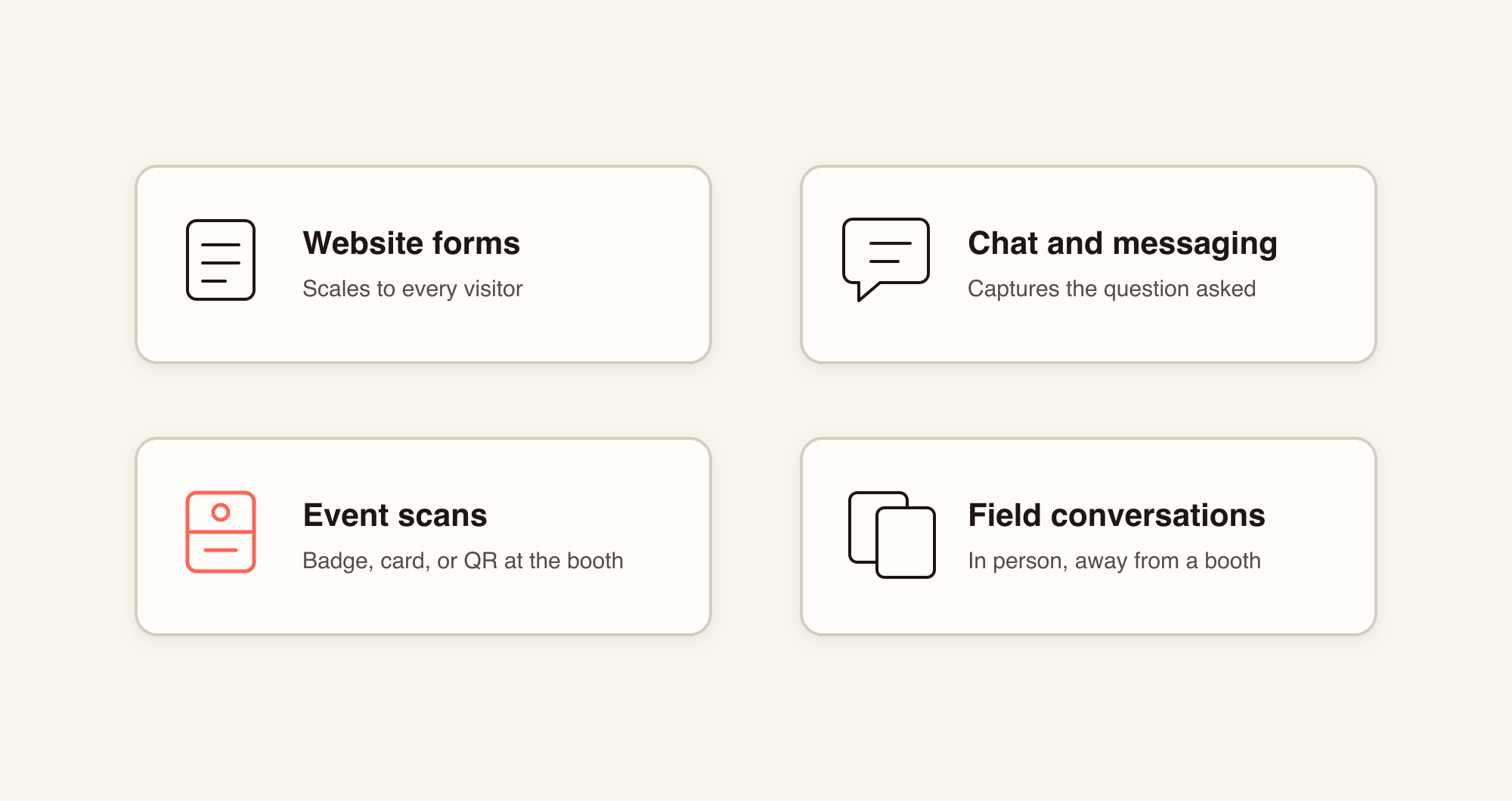
Four patterns account for most B2B lead capture: a form, a conversation, a scan, and a manual entry. Social and search lead forms, webinar and event registration, inbound phone, and product signups all feed one of those four, which is why this section is organized by pattern. In each one you trade reach for context.
Website forms
Website forms capture leads by asking visitors to type their details, usually in exchange for something worth having. They sit on product and pricing pages, in popups, and behind gated content, and they are where most teams start, because a form scales to every visitor without costing a rep's time. What the form asks for is all the context sales will get, which is why the field question below matters more than it looks.
Lead capture pages
A lead capture page is a standalone landing page whose only job is converting a visitor into a lead, usually by trading a guide, a webinar, or a demo for contact details. One call to action, stripped-back navigation, nowhere else to click, and it is normally where campaign traffic lands. For where generic form builders fall short at this job, see our comparison of Google Forms alternatives for lead capture.
Chat and messaging
Chat captures leads inside a conversation the visitor started, so the qualifying questions arrive as part of answering a real one, and the transcript lands on the record beside the contact details. Chat suits sites with enough traffic to justify staffing it, or a bot that can answer genuine product questions. Below that volume a well-placed form captures more and costs less attention.
Event lead capture at trade shows and conferences
At a trade show, exhibitors capture leads three ways: scanning the attendee's badge with their own event lead capture app, scanning a business card, or exchanging details by QR code or digital card. Renting the organizer's scanner is a fourth route, and the narrower lead retrieval case covered above.
Exhibitors and attendees want different things from a booth interaction. Asked to pick the top three things that would most improve those interactions, 49% of exhibitors chose being scanned and emailed afterward about products and services, against 23% of attendees, while speaking with a subject matter expert drew 58% of attendees against 26% of exhibitors (Freeman Trends Report 2025; 1,022 attendees and 969 exhibitors, +/- 3.1%; Freeman sells event services). The survey did not test why, but the scan-and-email most attendees have experienced is a generic message days later with nothing from the conversation in it. Recording the conversation beside the contact is what lets a follow-up name what you actually discussed.
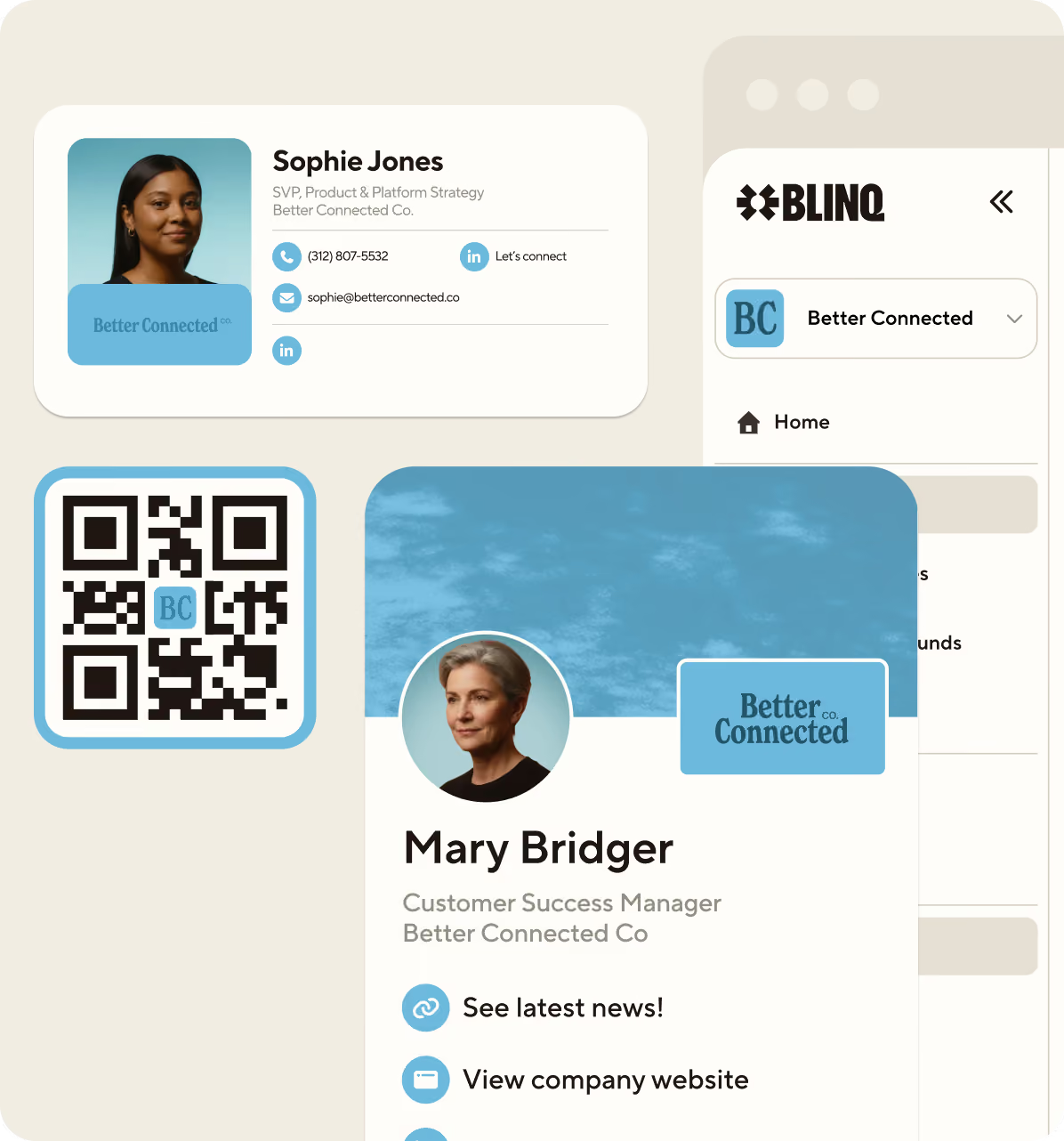
Blinq's event lead capture app scans business cards and QR codes at any event, reads attendee badges at shows running a supported registration platform, and can sync leads to HubSpot, Salesforce, and Microsoft Dynamics, among other supported CRMs, with your notes attached. For the booth workflow itself, from pre-show setup through to same-day follow-up, see our guide to capturing leads at events, or check out our list of the best trade show lead capture apps of 2026.
Field conversations
Field conversations are the in-person leads that happen away from a booth: at customer sites, at conferences you attend without exhibiting, and in hallway introductions. A rep can share a digital card and collect the prospect's details back through the form attached to it, so the contact reaches the CRM without anyone typing.
Reps lose these leads by retyping them later, from a photo of a card or from memory, and scanning removes that step for the contact details. For the conversation itself, a dictated voice note in Blinq's AI Notetaker gets transcribed, summarized, and filed against the right contact, so the detail does not have to survive until Friday. Two limits worth knowing: if no clear speech is detected you get no summary at all, and the rep still has to remember to dictate before the next conversation starts.
Lead capture examples
Lead capture examples differ by channel, and the test that matters is what reaches the CRM at the end of each one. The four below cover the web and in-person halves of the job, side by side.
| Channel | What happens | What lands in the CRM |
|---|---|---|
| Website form | A visitor downloads a benchmark report | Name, work email, company, and the report they wanted |
| Chat | A visitor asks about a Dynamics integration and leaves an email for setup docs | Contact details plus the conversation transcript |
| Trade show booth | A rep scans a badge during a conversation about a migration project | Badge details plus two lines of notes naming the project |
| Field conversation | A rep shares a digital card between conference sessions | Details returned through the card’s form, plus a dictated summary |
Lead capture forms: what to collect
Website forms carry the most volume of any channel, so they are worth a closer look. A lead capture form should ask for the minimum you need to qualify and follow up. For most top-of-funnel forms that means a name, a work email, a company, and one qualifying question, with the rest coming from enrichment or the first conversation.
The trade-off where more fields buy qualification at the cost of submissions is real but weaker than the folklore version suggests. The best-known field-level analysis is HubSpot's study of more than 40,000 customer landing pages by Dan Zarrella (HubSpot sells forms software). Its finding is directional rather than a set of magnitudes: conversion fell less than expected as field counts grew, and field type mattered more than field count, with free-text areas and stacked dropdowns depressing it most.
What to collect, by stage and channel:
- Top of funnel: name, work email, company.
- Mid funnel: role, team size, or the use case they are evaluating.
- In-person capture, any stage: whatever the badge or card provides, plus qualifying notes captured while the conversation is fresh. There is no form to shorten here, so the limit is how much attention the rep has.
Types of lead capture form
- Inline or embedded: low-friction newsletter and content signups.
- Popup and exit-intent: behavior-triggered, higher volume and lower intent.
- Multi-step: splits a long form across screens, suiting quote and application flows.
- Gated content: trades a report or template for details.
- Demo or quote request: high intent, and the one place extra qualifying fields pay for themselves.
- Event registration: captures at signup, then again at the event.
Progressive profiling asks returning visitors something new instead of repeating the whole form, so the record builds across visits. It needs your platform to recognize the visitor, so first-time traffic still sees the full form.
Lead capture software and tools: how to choose
Lead capture software splits along the same lines as the channels above: form and landing page builders for the web, chat tools for conversations, event lead capture apps for the floor, and the capture features bundled into your CRM. Teams that exhibit or work in the field usually run two of these, because a web stack and an in-person stack share almost nothing except the CRM they both write to.
G2 cuts the space differently again, tracking lead capture, event lead capture, and lead retrieval as three separate categories, which is a useful map when you shortlist.
The two stacks answer to different tests. Judge an in-person tool on adoption (reps use it without being chased), reliability (scans land every time, enrichment comes back accurate, integrations hold), admin and provisioning across a large team, and attribution back to the event that produced the pipeline. Judge web capture on whether it writes to the CRM without middleware, whether marketing can change a form without engineering, whether it survives your consent banner, and whether you can test the page it sits on. For a full evaluation checklist on the in-person side, see our guide to choosing event lead capture software.
How to measure lead capture
Five numbers tell you whether lead capture is working: conversion rate, cost per lead, speed to first follow-up, capture-to-CRM time, and lead-to-opportunity rate. Public benchmarks exist for the first; the middle two are where teams lose pipeline without noticing.
For web conversion, Unbounce's 2024 Conversion Benchmark Report puts the median landing page conversion rate at 6.6%, ranging from 3.8% to 12.3% by industry (41,000+ pages, all built in Unbounce). A median is a midpoint, not a target, so set your baseline from your own pages.
Calculate cost per lead yourself: total channel cost, including staff time and, for events, booth and travel spend, divided by qualified leads captured. Speed to first follow-up and capture-to-CRM time are internal metrics you measure timestamp to timestamp. Lead-to-opportunity rate is the check on the other four, because shortening a form or scanning everyone who walks past raises volume and can lower quality at the same time.
Lead capture best practices
Lead capture best practices depend on which number you are trying to move, because the change that lifts form submissions is not the change that speeds up follow-up. Pick the goal first, then the practice. None of the four below needs new software to start.
- More submissions: shorten the form by field type, not field count, and let enrichment fill the rest.
- Better follow-up: capture qualifying notes while the conversation is live, because the specifics fade first.
- Faster response: get the record to the CRM the same day and give it an owner on arrival. Response time cannot beat the time the record takes to arrive.
- Proof it works: track speed to first follow-up and capture-to-CRM time next to volume, which hides both failures on its own.
Lead capture compliance: consent and privacy basics
Three rule sets cover most US and EU lead capture: the GDPR for EU residents' data, the CCPA for California residents once a business crosses set thresholds, and CAN-SPAM for follow-up email in the US. None of them prohibits lead capture.
These are baselines, not advice. If you capture across borders, involve counsel.
Under the GDPR, consent is one of six lawful bases, and many B2B teams rely on legitimate interests instead. Where you do rely on consent, Article 4(11) requires it to be "freely given, specific, informed and unambiguous," given by a clear affirmative action, so a pre-ticked box will not do.
The CCPA applies to for-profit businesses above set thresholds, and where it applies you owe a notice at or before the point of collection naming what you collect and why. For US email follow-up, CAN-SPAM sets no consent requirement, and the FTC notes it "makes no exception for business-to-business email," but it does require accurate headers, ad identification, a valid postal address, and prompt opt-out handling.
In person the mechanics differ. A badge scan is normally covered by the attendee's registration agreement with the organizer, which is why the organizer's terms decide what you may do with the data, and why using your own app does not remove the need to say who you are and what happens next. A one-line notice at the booth is the in-person version of the notice at collection. Outside the US and EU, add the local equivalent such as CASL, the Spam Act, or PECR, plus TCPA if you follow up by phone or SMS.
Where to start
If your web forms already write to the CRM, in-person capture is the bigger gap: badges surface weeks after the show and business cards stay in jacket pockets. If they do not, start there, because nothing else here matters when the record never arrives.
On the web side, timestamp the gap between submission and first outbound touch, then fix whichever culprit you find: a manual export step, an unassigned owner queue, or an approval gate on new records. On the in-person side, Blinq's event lead capture app turns a business card or QR scan into a contact in your CRM while the conversation is still fresh. Explore Event Lead Capture or talk to our team before your next event.
FAQs
What is an example of lead capture?
A visitor downloading a gated report and submitting their name, work email, and company is the most common example. At a trade show, a rep scanning an attendee's badge and adding two lines of notes about the project they discussed is the in-person equivalent. In both cases the output is the same: a record in the CRM that somebody can act on.
Is lead capture the same as lead generation?
No. Lead generation is the broader work of creating interest through content, ads, events, and outreach. Lead capture is the step that records who showed it. A campaign can generate plenty of interest and still capture few leads if the recording step fails.
What is the difference between lead capture and lead retrieval?
Lead retrieval is the narrow, event-specific case where you rent the show organizer's scanner and receive whatever their registration system holds, for that show only. Lead capture is the whole category, and event lead capture is the in-person part of it run on software the exhibiting company owns and carries between shows.
Is lead capture the same as a CRM?
No. Lead capture is the intake step that creates the record; the CRM is where your team works it. Capture tools that never reach the CRM produce leads nobody follows up on, so check how deep the sync goes as well as what the tool can capture.
How do you capture leads at an event or trade show?
Exhibitors capture leads by scanning badges or business cards with their own event lead capture app, exchanging details through QR codes and digital business cards, or renting the organizer's badge scanner, which only covers the shows where you rent it. Own-app badge scanning depends on the show running a supported registration platform.
What is lead capture software?
Lead capture software turns interest into structured records, and it splits into form and landing page builders, chat tools, event lead capture apps, and the capture features built into CRMs. G2 tracks lead capture, event lead capture, and lead retrieval as three separate categories, which helps when mapping the space.