








.avif)

A lead enrichment tool takes the little you have on a lead, usually a name and a company, and fills in the rest: verified email, direct phone, job title, LinkedIn, and company details. The tools that do it well differ on two things: the quality of their data, and when the enrichment happens (on the spot as you capture a lead, or later in a batch). This guide ranks the best lead enrichment tools for 2026 on both, so you can match a tool to how your leads arrive.
Key Takeaways (TL;DR)
- Data quality and timing are separate questions. A tool can hold great data and still fail you if it only runs hours after you needed the lead complete.
- A name and a company are often enough to complete a record. Enrichment matches those against B2B data sources and appends verified email, phone, title, and LinkedIn.
- Match rates are probabilistic, and every vendor measures "success" differently. Treat a headline percentage as a claim until you know what it counted.
- Desk databases and capture-native tools solve different problems. Some tools are built to enrich a list you already hold; others complete a lead the moment you meet the person, and a few do both.
- Check the privacy terms before you upload a list. Some vendors train models on customer data, so ask each one in writing.
- Blinq ranks first for teams whose leads start face to face, because it enriches a scanned badge or card in seconds and syncs the finished contact to the CRM.
The best lead enrichment tools for 2026 at a glance
The best lead enrichment tool depends on where your leads come from, and how you want to buy, whether that's a self-serve credit plan or a negotiated contract. Some teams need a lead completed the moment they meet someone; others enrich lists from a desk and care most about coverage and cost. Blinq leads for contacts captured in person; desk databases like ZoomInfo and Clay lead for enriching lists you already hold.
| Tool | Best for | Enrichment model | When it enriches | Native CRM sync | Free plan | How you buy |
|---|---|---|---|---|---|---|
| Blinq | Capturing + enriching leads in person | Waterfall, 25+ partners | Real time at capture, plus bulk lists | HubSpot, Salesforce, Dynamics +more | Yes (cards; enrichment on paid) | Self-serve; enrichment from $7.33/mo |
| ZoomInfo | Enterprise database coverage | Proprietary database | Batch or on demand | Native connectors | No | Custom contract |
| Clay | Custom enrichment workflows | Waterfall, 150+ providers | After import, in workflows | Via integrations | Yes (100 data credits/mo) | Self-serve, from $167/mo |
| Apollo | All-in-one prospecting | Database + outreach | On demand or batch | Native connectors | Yes | Free start; per-seat plans |
| Cognism | Phone-verified data, EMEA | Database, phone-verified | Batch | Native connectors | No | Custom contract |
| Clearbit (HubSpot Breeze) | HubSpot-native enrichment | Database, inside the CRM | Automatic in HubSpot | HubSpot only | No (credit-based) | Credits via HubSpot |
| Hunter | Lightweight email finding | Email finder + verifier | On demand | Native connectors | Yes (50 credits/mo) | Self-serve, from $34/mo |
| Lusha | Simple per-lookup checks | Database, per lookup | Per lookup | Native connectors | Yes (40 credits/mo) | Self-serve, from $49.90/mo |
How we evaluated lead enrichment tools
We scored each tool on the same criteria, applied the same way to all eight:
- Data coverage and fill rate: how often the tool actually returns the field you asked for, across your target regions and roles.
- Accuracy and verification: whether emails are deliverability-tested or pattern-guessed, and how phone numbers are verified.
- When enrichment happens: in real time at the moment of capture, or in a batch against records you already hold. Not every team needs real time; it matters most when leads arrive in person.
- CRM sync depth: native connections to Salesforce, HubSpot, and Dynamics, and whether fields stage for review before they push.
- Integrations and API: how well the tool plugs into the rest of your stack.
- Ease and automation: how much setup and upkeep it takes before it pays off.
- Pricing and how you buy: whether you can start on a free tier or self-serve credits, or need to negotiate a contract first.
- Security: SOC 2, SSO, and whether the vendor trains models on your data.
Blinq publishes this guide, so we've been explicit about where Blinq wins and where another tool is the better buy.
The 8 best lead enrichment tools, reviewed
Each tool below is scored on the same points: who it's best for, how it enriches, how it syncs, what it costs, and where it falls short.
1. Blinq, best for capturing and enriching leads in person
- Best for: sales and field-marketing teams whose leads start at events, trade shows, and meetings, where a lead arrives as a badge scan or a business card rather than a CRM row.
- How it enriches: Blinq enriches a lead at the point of capture. Scan a badge or card and it completes the record in 3 to 15 seconds, running the name and company through 25+ waterfall data partners to append verified email, direct phone, title, company, and LinkedIn. Every email is verified before it saves, and a field it can't confirm stays blank instead of getting guessed. Because it runs while you're still with the person, you can confirm any piece of information on the spot, with every enriched field editable before it syncs. Blinq also offers bulk enrichment from the Blinq Business dashboard: upload a list before an event to research who you'll meet, or after one to complete records captured elsewhere.
- CRM sync and integrations: native real-time sync to the major CRMs, including HubSpot, Salesforce, Microsoft Dynamics, and Marketo, with the lead assigned to the rep who captured it. Zoho and Pipedrive connections are native too. Security is SOC 2 Type II with SSO for teams.
- Pricing: the free plan covers the digital cards. AI enrichment starts on the Premium plan at $7.33 a month billed annually. Team lead capture and enrichment sit on the Business plan, from $4.99 per card a month billed annually with a five-card minimum. Enrichment during lead capture is included in the credit cost of the capture itself. Bulk enrichment draws on credits, charged on the verified emails and phone numbers actually returned.
- Where it's limited: Blinq's sweet spot is the capture moment. It also enriches uploaded lists in bulk, so it isn't capture-only, but if you need continuous enrichment directly accessed from your CRM without in-person capture, a dedicated data platform like ZoomInfo may be more suitable. Blinq doesn't train models on your data, which rules out lookalike modeling from your own contacts.
2. ZoomInfo, best for enterprise database coverage
- Best for: enterprise sales and marketing teams enriching large CRM databases and running account-based programs at scale.
- How it enriches: ZoomInfo runs one of the largest B2B databases, around 321 million professionals across 104 million companies, and appends firmographics, direct dials, org charts, and technographics. It layers on buyer-intent signals that flag which accounts are researching your category and website-visitor identification, so the data feeds targeting as well as record completion. Jobs run on a schedule or on demand against records you already hold.
- CRM sync and integrations: native connectors for Salesforce, HubSpot, and Dynamics, with automated enrichment and data-hygiene workflows.
- Pricing: custom quotes only, with no public price list. Third-party analyses put a typical all-in cost around $30,000 to $60,000 a year once seats and add-ons are included.
- Where it's limited: the useful extras carry real cost. Intent data is usually a separate add-on, and much of the depth sits in higher tiers, so the entry impression understates the spend a small team would face.
3. Clay, best for RevOps teams that want custom enrichment workflows
- Best for: ops teams building custom enrichment workflows across many providers.
- How it enriches: waterfall enrichment across a marketplace of 150+ data providers, so a miss in one source falls through to the next, plus AI research agents and a spreadsheet-style builder for custom workflows. Per Clay's pricing docs, a lookup that returns nothing costs no credits.
- CRM sync and integrations: connects to CRMs and the wider stack through its integrations and API.
- Pricing: Clay charges in two units, data credits for enrichment lookups and actions for workflow steps. The free plan includes 100 data credits and 500 actions a month; paid plans start at $167 a month billed monthly, less on annual, with allowances from 15,000 actions a month.
- Where it's limited: it's a build-it-yourself tool, so the workflows take real setup and ongoing upkeep before they pay off, and there's a learning curve for anyone new to it. Because workflows spend actions on top of the data credits that enrichment uses, costs can add up fast at volume.
4. Apollo, best all-in-one for prospecting
- Best for: small and mid-size teams that want a contact database, enrichment, and outbound sequencing in one tool.
- How it enriches: Apollo pairs a large contributory B2B database with CRM enrichment, buyer-intent signals, and on-demand or scheduled jobs. Because email sequencing and a dialer live in the same product (sequencing is included on every plan, per Apollo's pricing page), prospecting and follow-up don't need a second tool.
- CRM sync and integrations: native CRM connectors and a widely used API.
- Pricing: a free Starter plan with a monthly credit allowance; paid tiers priced per user, so cost scales with seats.
- Where it's limited: it's a generalist, and data depth varies by region, so a specialist tends to beat it on any single field such as verified mobiles or European coverage.
5. Cognism, best for phone-verified data in EMEA
- Best for: teams that call their leads, especially across Europe.
- How it enriches: Cognism's edge is phone-verified mobile numbers, which it markets for up to 3x higher connect rates, backed by a compliance-first stance it positions as GDPR and CCPA aligned. Coverage is strongest across EMEA, and it calls itself Europe's most trusted B2B data.
- CRM sync and integrations: native connectors for the major CRMs.
- Pricing: custom quotes, with no public price list.
- Where it's limited: the value concentrates in Europe, so outside EMEA, US-focused databases tend to match or beat it on coverage.
6. Clearbit (HubSpot Breeze Intelligence), best for HubSpot-native enrichment
- Best for: HubSpot teams that want records to enrich inside the CRM on their own.
- How it enriches: automatic company and contact enrichment on HubSpot records, plus form shortening that auto-fills known fields. HubSpot acquired Clearbit in 2023 and folded it into Breeze Intelligence in 2024.
- CRM sync and integrations: built for HubSpot first, sold as Breeze Intelligence credits.
- Pricing: credit-based through HubSpot.
- Where it's limited: the value is tied to living in HubSpot. Teams on Salesforce or Dynamics get little from it.
7. Hunter, best lightweight email finding and verification
- Best for: small teams and individuals who mostly need to find and verify work emails.
- How it enriches: email finder, verifier, and domain search, with a Discover database and lead enrichment on its paid tiers. The credit model is simple, one credit per email found and half a credit per verification, per Hunter's pricing page.
- CRM sync and integrations: an API on every plan including the free tier, plus a browser extension, a Google Sheets add-on, and native CRM integrations.
- Pricing: free plan with 50 credits a month; the Starter plan is $34 a month billed annually, with 2,000 credits.
- Where it's limited: it's email-first, so it's thinner on phone, firmographics, and record depth once you need a full contact. It's a focused component you'd pair with a fuller platform.
8. Lusha, best for quick per-contact lookups
- Best for: individual reps and small teams doing one-off contact lookups.
- How it enriches: contact and company data through a browser extension and API, with credits spent per lookup, handy for a quick check on a prospect before a call.
- CRM sync and integrations: native connectors for the major CRMs.
- Pricing: free plan with 40 credits a month; paid plans from $49.90 a month.
- Where it's limited: it's built for spot checks, so cost per record climbs and coverage thins at volume. It works best alongside a primary tool.
Types of lead enrichment tools, and which fits your team
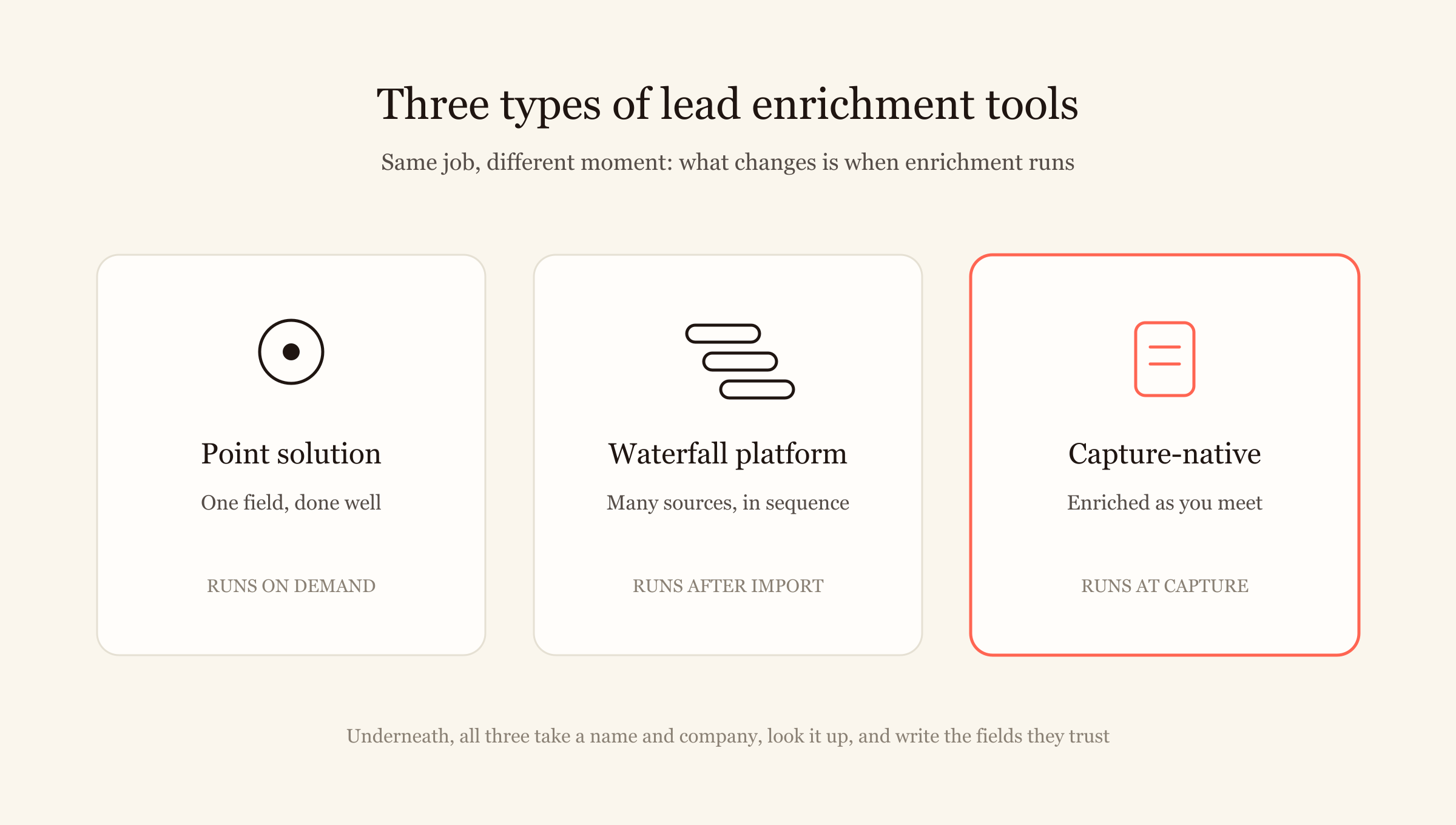
Enrichment tools come in three shapes, and they suit different buyers.
- Point solutions specialize in one data type, typically email or phone. Hunter is the classic email example, and Cognism covers the phone side with its verified mobiles, even though it sells as a fuller database. Per-lookup tools like Lusha sit nearby, built for quick checks on a single contact. You get depth in one field and gaps around it, which is fine when that one field is all you need.
- Waterfall platforms like Clay chain many providers in sequence, so a miss in one source falls through to the next. Coverage improves, and someone has to build and maintain the workflow. This is desk enrichment for lists you already hold.
- Capture-native tools run enrichment the moment you meet someone, so a name and company from a badge or card become a full record while the person is in front of you. Blinq works this way, and also enriches uploaded lists in bulk.
Underneath, the mechanism is the same across all three. The tool takes two or three anchor fields, looks the person up across B2B data sources, scores how confident the match is, and writes the fields it trusts. What changes is when it happens, and whether you can still correct a wrong field when it does.
How to read a vendor's match-rate claim
No tool fills every field on every record, so treat accuracy as a probability. Match quality drops in predictable places: common names can produce ambiguous matches, and small or private companies leave a thin public footprint. Government and blue-collar contacts often sit outside B2B databases entirely. Data also goes stale over time, since B2B databases decay at about 2.1% a month, roughly 22.5% a year, per HubSpot's analysis based on MarketingSherpa research, so even good data needs refreshing.
That's why the headline match rate a vendor advertises tells you less than it appears to. A "95% match rate" might mean 95% of records got at least one field, or 95% of emails were verified, or 95% of a hand-picked test list matched. Five questions expose what the number actually counts:
- Is the rate per field or per record? Appending a company website to most records is easy. A verified direct phone is not.
- Does "match" mean verified, or just found? Found data can be years old.
- Which audience and regions was it measured on? Rates built on US tech contacts won't hold for EMEA manufacturing.
- Are emails deliverability-tested or pattern-guessed? An address guessed from the first.last pattern is exactly that, a guess.
- What happens on a non-match? Some tools leave the field blank; others write a guess into your CRM, which is worse than an empty field.
Why fast follow-up depends on enrichment speed
A complete lead is only useful if it's complete in time to act on. Harvard Business Review's study of lead response times found that firms which contacted a lead within an hour were nearly seven times likelier to have a meaningful conversation with a decision-maker than those that waited even an hour longer. Enrichment is often the hidden delay. When leads pile up as a badge export or a raw list and get enriched in a batch later, the fast-follow-up window closes for the whole file while it waits on ops.
This is where capture-native enrichment earns its place for one kind of buyer. If your leads arrive in person, enriching them on the spot means the first follow-up can go out the same day, while the conversation is still warm. One Blinq customer described it on a recorded call: "We do 60 something events a year... you take a picture of someone's business card and it auto enriches with their LinkedIn... [With] event badges, you can take a picture of that [and] enrich. It automatically creates a lead and that lead is automatically put into Salesforce and attached to the rep." (VP of marketing, logistics software.) For a team enriching a static database, coverage matters more than speed, and a desk tool is the better call. The right tool depends on where your leads come from. If capture is the harder part for you, start with our guide to event lead capture software.
See what enrichment looks like when it happens the moment you meet someone. Book a demo of Blinq.
Frequently asked questions
What is lead enrichment?
Lead enrichment is the process of completing a partial lead record. You start with a little, often a name and a company or an email, and enrichment software matches that against external B2B data sources to append verified details like work email, direct phone, job title, LinkedIn, and company information, turning a thin record into a contact your team can act on.
What's the best lead enrichment tool?
It depends on where your leads come from. For enriching a large static database at your desk, ZoomInfo leads on database coverage and Clay on custom enrichment workflows. For finding and verifying emails cheaply, Hunter is a strong pick. For leads captured in person at events, Blinq ranks first, because it enriches a badge or card in seconds and syncs the finished contact to your CRM.
Can software fill in missing fields after scanning an event badge?
Yes. A badge scan gives a tool a name and a company, which is enough to look the person up in B2B data sources and append verified email, phone, and title. Blinq does this in seconds while you're still with the person, and every appended field stays editable so your team can review it before it syncs. If capturing leads at events is the wider problem, the capture step matters as much as the enrichment.
How much do lead enrichment tools cost?
Pricing splits into two models. Self-serve tools publish credit-based plans: Hunter starts at $34 a month billed annually, Lusha at $49.90 a month, and Clay at $167 a month, each with a limited free tier. Enterprise databases like ZoomInfo and Cognism use custom quotes. Blinq has a free plan for its cards, with AI enrichment from $7.33 a month on Premium and team lead capture on the Business plan from $4.99 per card a month.
Does Blinq train AI models on my data?
No. Blinq doesn't train AI models on your captured contacts, and one contact is never used to enrich another. Your data is protected by SOC 2 Type II controls with SSO for team access. If you're comparing vendors, ask each one to put its data-training policy in writing before you upload a list.
Which CRMs do lead enrichment tools sync to?
Most tools connect to the major CRMs, though depth varies. Blinq has native, real-time sync to HubSpot, Salesforce, and Microsoft Dynamics, plus Zoho, Pipedrive, and Marketo, with leads attributed to the rep who captured them. Clearbit works inside HubSpot only. Desk tools like ZoomInfo, Apollo, and Lusha offer native connectors for database enrichment.