


.avif)
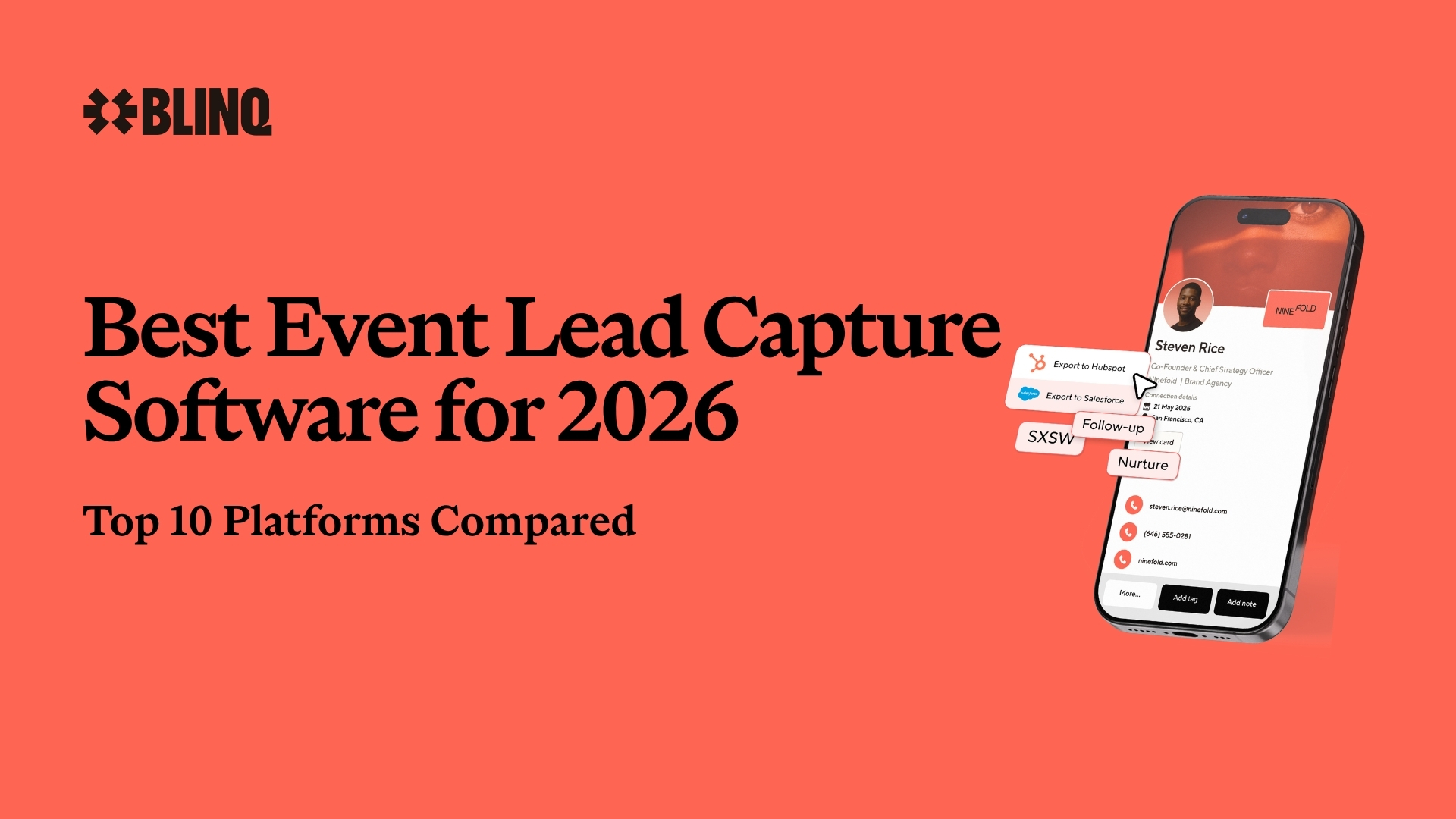

In an increasingly AI world, in-person events and face-to-face trade are becoming more and more important for brand and commercial growth. The value of human connection may be at an all-time high for brands and individuals, and event lead capture software exists to make sure the people you meet on a show floor actually make it into your pipeline.
People come to shows to talk to people: 58% of attendees put speaking with a subject matter expert among the top three things that would most improve their booth interactions, per Freeman's 2025 Commercial Trends Report (1,022 attendees surveyed), and Freeman's 2024 research (2,002 attendees) found attendees rank pre-planned exhibitor meetings above unplanned ones, behind only hands-on demos.
Companies are paying attention, too. CEIR's 2026 Marketing Spend Decision Report puts exhibiting at roughly 41% of the average exhibitor's marketing budget. With this resurgence in in-person events comes new lead capture software to help event marketers and field sales teams increase their ROI for every trade show they attend. This technology gives teams a more flexible and dynamic tool that goes beyond the single-use apps and scanners used at individual events.
But not all event lead capture platforms are created equal. They also don’t always suit specific business needs or operating practices. While they can provide more consistent, faster and enriched lead capture, they all have their strengths and weaknesses.
In this article, we’re taking an in-depth look at the 10 best event lead capture platforms available for event marketers and field sales teams right now. We’ll compare their features and benefits for B2B marketers and provide detailed overviews for each one based on thorough online research and user reviews.
Key Takeaways (TL;DR)
- Blinq is the best event lead capture software for trade shows in 2026, ranked #1 in G2’s Lead Retrieval category, with over 9,400 reviews behind its 4.8 rating. Its AI Notetaker turns dictated voice notes and phone calls into summaries on the lead record; several rivals on this list now document or have announced their own take on conversation capture, and each entry below says which
- Top-rated software typically works universally (i.e. across all events), integrates with major CRMs, adds missing data with AI enrichment, and automates workflows
- It’s important to review user experiences on G2 or the App Store before committing to a particular platform
- Event lead capture software provides more flexibility, lower overall costs, more enriched data and AI-powered features compared to traditional badge scanners
- Flexible, usage-based pricing models are ideal for teams wanting to align their overall costs with the value they receive
- Flat-rate annual or monthly fees may work better for high-scale operations that can justify the higher cost with more leads on average
- Event lead capture software also functions offline, giving you the same capabilities as a traditional badge scanner when not connected
Ranking the Top 10 Best Lead Capture Platforms
Let’s start with what you came here for: our official ranking of the 10 best event lead capture platforms. You can see our complete list below, which details each platform’s G2 rating, usability, unique features, CRM syncing capabilities and typical pricing.
- Blinq - best for mid-market and enterprise teams
- Mobly - best for SMB lead capture
- Popl - best for teams needing additional list enrichment
- Captello - best for gamification
- BoothIQ - best for advanced reporting
- momencio - best for live event ROI tracking
- Whova - best for Whova events
- Leadature - best for attendee badge solutions
- Zuant - best for questionnaire-led qualification
- CompuLead - best for CompuSystems shows
| Company | Best for | G2 Ranking | G2 Reviews | Usability | Unique features | CRM sync | Pricing |
|---|---|---|---|---|---|---|---|
| Blinq | Mid-market and enterprise teams | #1 | 4.8/5 from 9,426 reviews | High - top rated app and dashboard UX | AI enrichment, AI notetaker, digital business cards | Yes - native | Usage-based, $9.99 per lead captured |
| Mobly | SMB lead capture | Outside category top 10 | 4.8/5 from 108 reviews | Moderate - delayed enrichment | AI-powered OCR with human verification | Yes - native | Not published; by quote |
| Popl | Teams needing additional list enrichment | #2 | 4.6/5 from 6,541 reviews | Moderate - mixed UX reviews | List enrichment, event intelligence, calendar booking | Yes - native | Not published; by quote |
| Captello | Gamification | #7 | 4.8/5 from 180 reviews | Low - unintuitive workflow | Gamified engagement | Yes | Not published; by quote |
| BoothIQ | Advanced reporting | Listed, no reviews yet | No reviews yet | High - simple setup | Event intelligence | Enterprise tier | Free tier; $999/month teams |
| momencio | Mid-market teams proving event ROI | #15 | 4.9/5 from 17 reviews | High - easy to use, small review base | Live event ROI dashboard, AI lead scoring | Yes - native | From $500/month (5-seat minimum) |
| Whova | Whova-platform events | #6 | 4.8/5 from 1,930 reviews | Moderate - lead capture app is add-on | In-app meeting scheduling | Export-based (CRM export) | Quote-based, per event |
| Leadature | Attendee badge solutions | 3 reviews only | 5/5 from 3 reviews | Low - steep learning curve | Badge printing, session scanning | Yes | Quote-based; per event or annual |
| Zuant | Questionnaire-led qualification | #20 | 4.4/5 from 27 reviews | Moderate - easy to use, some sync complaints | Weighted-answer lead scoring, consent capture in forms | Yes - native to Salesforce and Eloqua | Not published; by quote |
| CompuLead | CompuSystems shows | Not listed | Not listed | Low - per-event provisioning | Cross-event lead history | Yes | Per device or event, via show portal |
Data sourced from platform sites, G2's Lead Retrieval category and the App Store (last updated 21 September, 2026)
“We have a team member who often needs additional training and support when we implement new technology. After 15 minutes of training and his first event he said Blinq is the easiest lead capture tool he's used yet.”
Hunter Van Dyke, Demand Generation Manager at Timescapes
Comparing the Top 10 Lead Capture Platforms by Price
Of course, it’s not always about which platform offers the best features. Company budgets also play a factor, and you may not need a platform that offers numerous capabilities, but rather one that does what you need for a good price. One useful cost anchor: renting the organizer's handheld scanner runs $495 to $685 per show on 2026 order forms at shows like ATD, AAOS, NAB and NRA, before extras, so ask any quote-based vendor for an all-in per-event figure to compare against that baseline.
Let’s take a look at how the 10 best event lead capture platforms compare when it comes to price and pricing model.
| Platform | Pricing Model | Typical Cost | Free trial |
|---|---|---|---|
| Blinq | Usage-based | $9.99 per lead captured, billed monthly in arrears; duplicate captures don’t consume credits | 30-day free trial of Blinq Business |
| Mobly | Subscription | Not published; by quote | No; demo only |
| Popl | Usage-based | Not published; by quote | No trial of its event product; demo only |
| Captello | Per event or annual fee | Not published; by quote, with custom pricing for enterprises | No; complimentary event package for select new customers |
| BoothIQ | Flat-rate subscription | Free for individuals; $999 per month for teams (unlimited users, events and scans) | No trial; free plan for individuals |
| momencio | Monthly subscription | From $500 per month (5-seat minimum); larger teams quoted | No free trial |
| Whova | Per event fee | Quote-based; usually bundled with Whova’s event management tools | Trial available after a booked demo |
| Leadature | Per event or annual subscription | Quote-based; one-time event or yearly options | No; demo only |
| Zuant | Tiered annual subscription | Not published; quoted across Classic, Pro and Enterprise tiers | No; demo account on request |
| CompuLead | Per event or per device | Ordered through each show’s exhibitor portal; varies by show | No; ordered per show |
Data sourced from vendor pricing pages and help centers (last updated 21 September, 2026)
Comparing the Top 10 Lead Capture Platforms by User Reviews
Most lead capture platforms only let you book a demo before deciding whether to commit. This can make it hard for event marketers to decide which platform is the right one before they commit budget. Blinq is the only platform in this top 10 that offers both: a demo, and a self-serve 30-day free trial of Blinq Business.
Fortunately, that’s where user reviews can help. One of the best ways to research lead capture technology before purchasing a subscription is by reading the appraisals of current users. The platforms’ overall rating on review sites, like G2 and the App Store, should be considered. You may also want to take into account the number of reviews and look at individual appraisals.
Let’s look at how the 10 best event lead capture platforms compare when it comes to user reviews on G2 and the App Store.
| Platform | G2 Rating | # of G2 Reviews | App Store Rating | # of App Store Ratings |
|---|---|---|---|---|
| Blinq | 4.8/5 | 9,426 | 4.9/5 | 130,000+ |
| Mobly | 4.8/5 | 108 | 4.8/5 | 20 |
| Popl | 4.6/5 | 6,541 | 4.8/5 | 102,000+ |
| Captello | 4.8/5 | 180 | 4.6/5 | 432 |
| BoothIQ | Listed, no reviews yet | 0 | 5/5 | 5 |
| momencio | 4.9/5 | 17 | 5/5 | 3 |
| Whova | 4.8/5 | 1,930 | 4.8/5 | 249,000+ |
| Leadature | 5/5 | 3 | Unrated | 0 |
| Zuant | 4.4/5 | 27 | Recently reset | 0 |
| CompuLead | Not listed | N/A | Unrated | 0 |
Data sourced from G2 and the App Store (last updated 21 September, 2026)
What do those reviewers actually say? G2’s aggregated review themes (read 21 September 2026) make the pattern plain: ease of use leads the praise for Blinq (4,729 reviewers cite it), Popl (1,686) and Whova (177), while the most-cited complaints differ by tool: QR-code hiccups for Blinq, price for Popl, and learning curves for Captello and momencio.
How We Determined Our Rankings
As the creators of Blinq’s event lead capture technology, we can draw upon our expertise and experience with the platform to offer a transparent appraisal. For the other platforms featured on this list, we have used their websites, pricing pages, user reviews, FAQs, feature lists and various other documentation to evaluate their offerings.
Every review figure in this article was re-verified against G2 and the App Store on 21 September 2026, and vendor-page claims were re-checked through September 2026 (each carries its own check date), and where we have firsthand event experience it’s with our own product; the other nine assessments are desk research. Bear in mind that platform technology is rapidly advancing, so you may notice changes to certain brands’ offerings depending on when you’re reading this article. We intend for these rankings to be a useful guide and have tried to be as honest and transparent as possible in our reviews. We’ve ranked platforms with more valuable features, competitive pricing and positive user reviews highest. That also means our order isn’t G2’s: G2 orders by review signal alone, so a tool can sit high there and lower here (or the reverse) once features and pricing model are weighed.
However, you should still sanity-check any shortlist against your own event calendar, CRM and budget before you decide.
Ranking the Best Event Lead Capture Software in 2026
1. Blinq
Blinq is the best event lead capture software for trade shows and events. The technology is designed to provide much more than simple badge scanning, capturing enriched contact details and AI-powered conversational context through dictated voice notes.
Out of all the platforms on this list, Blinq has the strongest overall suite of features, including an AI Notetaker, capture that works at any event (business cards, QR codes and attendee badges) and real-time syncing to major CRMs. Blinq is also more than just a one-trick pony, giving you access to additional services that complement its lead capture software, including digital business cards and dynamic email signatures. Moreover, Blinq is ranked #1 in G2's Lead Retrieval category, where it also holds the Best Usability badge.
| Key Strengths | Key Considerations |
|---|---|
| AI lead enrichment (Blinq’s own published figure: 95%+ accuracy) | Does not include more niche features like gamification |
| AI Notetaker that captures conversational context to support follow-ups | Pulling the organizer’s registration data off a badge needs organizer-granted access (dedicated badge-kit providers go deeper there) |
| Strong UX supporting setup and widespread team adoption | Works offline but requires internet connection to sync contacts to CRM |
| Native integrations with major CRMs | Usage-based pricing may be less preferred than fixed fee per event for some companies |
This is also the tool we know firsthand. Blinq, which is backed by HubSpot Ventures, exhibited at HubSpot INBOUND 2025, and our field team used the app on the floor at more than 17 shows in 2026 as attendees. The notes on setup, scanning and syncing below draw on that floor time as well as the desk research described in our methodology. Enrichment availability varies by plan and account.
How much does Blinq cost?
Blinq’s event lead capture is usage-based: $9.99 per lead captured, billed monthly in arrears. Duplicate captures of the same contact don’t consume credits, and if a captured lead isn’t enriched, only a partial credit is used. Lead capture comes with Business plans, which start at $4.99 per user per month billed annually. Blinq Business comes with a 30-day free trial.
“The integrated lead form is especially useful, allowing me to capture notes and ensure that I never miss a follow-up.”
2. Mobly
Mobly is a dedicated lead capture platform that offers universal scanning across badges, business cards, and other ID forms. It also provides contact enrichment, filling in missing details from a variety of sources before syncing leads to your CRM. Its offline lead capture capabilities, automated follow-ups, and quality ROI reporting also benefit exhibitors.
With just over 100 G2 reviews, Mobly is not as widely used as Blinq or Popl, however, it has earned a strong 4.8-star rating on the review platform from customers working for Shutterstock, Salesforce, Ramp Financial and other prominent companies.
| Key Strengths | Key Considerations |
|---|---|
| Human-verified enrichment for teams that want checked data | Enrichment includes human verification, which can take time to return the data |
| Good in-app meeting scheduling for follow-ups | Doesn’t document AI conversation summaries (site and App Store listing checked 11 September 2026) |
| Quality multi-source AI data enrichment | Pricing is quoted as a subscription rather than per lead captured |
How much does Mobly cost?
Mobly doesn’t publish pricing; you’ll need to request a quote. The total depends on how many users and which high-level features you want.
“I love the data waterfall and their ability to get accurate information for the contacts we meet with at events.”
3. Popl
Similar to Blinq, Popl’s tech is AI-powered to enable richer lead capturing with automatically added details like emails, job titles, and relevant company information. It has performance tracking for ROI reporting, as well as direct CRM integrations for real-time syncing. In 2026 Popl also announced a partnership with Apollo and RocketReach to power the data layer behind its enrichment, and its product set now spans a universal badge scanner, list enrichment, event intelligence and calendar booking.
Popl doesn’t publish pricing for its event platform; it’s quote-based, and the total scales with the leads you capture and the seats you need. It ranks well on the App Store and now sits second to Blinq in G2’s Lead Retrieval category ordering.
| Key Strengths | Key Considerations |
|---|---|
| 30+ CRM integrations, including HubSpot | High usage-based pricing may be a barrier for adoption |
| AI lead enrichment and list enrichment | Its newly announced AI voice recorder (mid-2026) isn’t yet documented on its product pages |
| Second in G2’s Lead Retrieval category ordering | Some manual re-entry on forms |
How much does Popl cost?
Popl doesn’t publish clear pricing online; you have to request a quote or a demo, and there’s no free trial of its event product. The total you’ll pay annually will be based on the number of leads you capture and how many users you want on the platform.
“The main downside is that the data enrichment isn’t always perfect, especially with less common badges or international events, so an occasional manual edit is still needed.”
4. Captello
Unlike the top three event lead capture software, Captello is more enterprise focused with its technology and service. This works both ways: enterprise event programs get a purpose-built fit, while smaller teams get more platform than they need. Captello offers universal scanning across various ID forms, as well as custom contact forms. It’s best known for its gamification capabilities, offering various interactive games to boost stall engagement and lead capture at trade shows. Captello also documents conversation capture: a summary, action items and a full transcript attached to the lead, with consent controls.
Captello holds a 4.8-star G2 rating from around 180 reviews, indicating a much smaller user base than Blinq or Popl.
| Key Strengths | Key Considerations |
|---|---|
| One of the few platforms with gamification (e.g. spin-to-win and trivia) | Mobile app UX and usability complaints in user reviews |
| Unlimited users per license | Geared to enterprise event programs, which can be more than smaller teams need |
| Meeting Management Platform for turning leads into scheduled meetings | Enterprise-level pricing can be too expensive for many |
How much does Captello cost?
Captello doesn’t publish pricing, and its own pricing page isn’t live (the URL returned 404 when checked 21 September 2026); per-event and enterprise packages are quoted by sales. The total you pay will depend on how many events you attend and the kinds of features you want (e.g. gamification and meeting scheduling).
“During high-traffic events, the mobile app can occasionally feel a bit slow or laggy, especially when capturing a large number of leads in quick succession.”
5. BoothIQ
It’s a close call between BoothIQ and Captello, with both offering their own strengths and weaknesses when it comes to event lead capture. BoothIQ is an AI-powered platform that is more similar to Blinq in terms of advanced features, with AI notetaking capabilities that help you follow-up leads with context and personalized emails drafted by AI. It is a good alternative to traditional scanners with its enriched data capture, CRM sync on its Enterprise tier, and offline functionality. Its reporting is a real strength for a tool this young: the team plan shows which reps and which events bring the leads in.
One of BoothIQ’s areas of concern is scale: it’s now listed on G2 but has no reviews there yet, and it has just five App Store ratings, so the user base still looks small. This may change in the future.
| Key Strengths | Key Considerations |
|---|---|
| Strong offline capture | Listed on G2 but no reviews yet |
| AI-powered notes for conversational context and personalized follow-ups | AI-drafted emails require manual editing and sense-checking |
| Free tier for individuals | The flat subscription model can be costly for some brands and provides less flexibility and more opportunity to overspend |
How much does BoothIQ cost?
BoothIQ is free for individuals and costs $999 per month for teams, per its pricing page. The flat rate covers unlimited users, events and scans, and you can pause the subscription between event seasons instead of canceling. A third Enterprise tier, quoted by sales, is where CRM sync lives. This pricing model tends to be better for high-scale operations attending 50-100 events or more a year.
6. momencio
momencio is built for teams that need to prove event ROI alongside lead capture, with a live event dashboard that reports cost per lead and return while the show is still running. It captures via badge scan, business card, QR code and a kiosk mode for self-service, on iOS and Android.
AI EdgeCapture enrichment fills contact records from the scan, AI IntelliSense scores each lead against your ICP as it lands, and voice notes auto-transcribe into the lead record so conversation context follows the contact. Leads sync natively to Salesforce, HubSpot, Marketo and Microsoft Dynamics. The platform holds a 4.9 rating on G2, though from a small base of 17 reviews, so run a trial with your own reps before committing.
| Key Strengths | Key Considerations |
|---|---|
| Live event dashboard reports ROI and cost per lead while the show is still running | Adoption evidence is thin: 17 G2 reviews and 3 App Store ratings |
| Voice notes auto-transcribe into the lead record for conversation context | A five-seat minimum means a trial still costs $500 a month at the base tier |
| Native sync to Salesforce, HubSpot, Marketo and Dynamics | No published enrichment match rate to compare against |
How much does momencio cost?
momencio publishes its base pricing: from $500 per month with a five-seat minimum, with larger teams quoted. That makes it one of the few tools on this list with a visible starting price, though the seat minimum means teams smaller than five can't start cheaper.
“We participate in various trade shows each year, and managing lead capture and follow-up was always our biggest challenge. Since we started using momencio, everything has changed.”
7. Whova
Whova is an interesting one, because this lead capture technology is wrapped up in the company’s event management platform. At its best, Whova helps event organizers manage registrations and networking at their shows while also helping them capture leads from attendees. You can use it as an event exhibitor as well, but it feels tailored more towards organizers who can get the most out of its event management features.
On the plus side, Whova offers a level of gamification, including contests and coupons, to help increase booth traffic and engagement. It’s not as fleshed out as Captello’s but it’s still helpful. Its capture runs on QR codes and business-card scans, and for exhibitors, getting leads out is export-based: Whova’s lead retrieval pages (checked 21 September 2026) describe exporting leads, to spreadsheets or your CRM, rather than a native real-time sync. It’s usually better to use Whova at an event managed by Whova, as it’s not as functional at other shows. It still performs well with users, with a 4.8-star rating on G2 and a 4.8-star App Store rating.
| Key Strengths | Key Considerations |
|---|---|
| Some gamification for increasing booth traffic | Per-event pricing is quote-based, so you need enough captured leads at each show to justify the cost |
| A scanner-style capture flow tailored to the shows Whova manages | Event management tools may not be used or even needed by exhibitors |
| Highly rated on G2 and the App Store | No AI notes for conversation context |
How much does Whova cost?
Whova doesn’t publish exact costs; lead retrieval is quoted per event depending on which features you want included. The price usually includes its event management tools, making it more suitable for companies that manage their own events rather than attending shows run by others.
“Whova is easy to set up and allows you to store all the information you want from the event in one place.”
8. Leadature
Leadature is a mobile-focused event lead capture platform. You can use it to capture leads in custom qualification forms by scanning badges, QR codes or business cards. It offers a universal option that’s customizable and flexible across multiple events. It also has AI data enrichment, including AI-powered notes to help bring conversation context into your follow-ups. It even recommends actions to take when following up with leads, which is very similar to Blinq’s AI Notetaker.
The wider Leadature platform also covers registration, badge printing and session scanning, which is where its attendee-badge strength sits. Real-time syncing with major CRM platforms helps you follow up leads in minutes. It also offers some ROI reporting and works decently offline. Where Leadature falls short is visibility: it has just three G2 reviews (at 5.0 stars) and an unrated App Store listing, which makes the user experience hard to judge at scale. Its pricing is also quote-based rather than published.
| Key Strengths | Key Considerations |
|---|---|
| A yearly subscription option works well for high-scale operations (50+ events per year) | Subscription pricing can be costly for some brands and provides less flexibility |
| Direct CRM integration | The dated user interface can be a bit jarring for first-time users |
| Data enrichment and conversation notes | Too few public reviews to validate its AI claims at scale |
How much does Leadature cost?
Leadature prices by quote: per its own site FAQ, you can pay for a one-time event or take a yearly subscription. Ask for the per-event breakdown when you compare it against usage-based tools.
9. Zuant
Zuant is built around the qualifying questionnaire. Reps work through a custom form as they capture, each answer carries a weight, and the lead lands in the record already scored. It captures on iOS and Android, with a kiosk mode for self-service and a prize draw feature for pulling people to the booth.
Consent tooling is the standout: privacy statements, signature boxes and consent widgets drop into any Zuant form, with audit trails and data removal on request, which matters on GDPR-sensitive calendars. Zuant AI populates the record from a photo of a badge or business card, with no published match rate, and leads connect natively to Salesforce and Eloqua, with HubSpot, Marketo and Pardot through connectors. It holds 4.4 stars on G2 from 27 reviews, with recent reviewers praising ease of use and support and some reporting sync issues.
| Key Strengths | Key Considerations |
|---|---|
| Weighted-answer lead scoring turns the questionnaire itself into the qualification engine | Native CRM connections cover only Salesforce and Eloqua; others go through connectors |
| The strongest consent and GDPR tooling on this list, collected in the capture form itself | No published enrichment match rate, and the App Store rating was recently reset |
| Kiosk mode and offline capture, with a card scanner that works without a connection | Pricing isn't published; every package is quoted |
How much does Zuant cost?
Zuant doesn't publish pricing. Packages are quoted across Classic, Pro and Enterprise tiers, billed annually.
“I really enjoy the AI functionality, where I can scan a badge of someone attending our booth, and it'll automatically populate with their details.”
10. CompuLead
We’ve ranked CompuLead last on our list of the best event lead capture software because of its limited capabilities. It’s essentially an event badge scanner with native CRM integration. If that’s all you’re looking for, this might be a good option. However, it doesn’t offer any features that enrich your captured leads or provide conversational context (CompuSystems’ own site carries no enrichment or AI-notes mention, checked 21 September 2026). What you do get is fast lead syncing to your CRM, but this still doesn’t always allow for same-day follow-ups.
CompuLead has great offline functionality and is mobile based, so it’s more user friendly and adaptable than traditional badge scanners. However, it’s not a universal scanner as it can only scan attendee badges. Otherwise you need to manually input their details. This sort of defeats the purpose of investing in this technology. It’s a practical but more traditional option that pales in comparison to modern methods.
| Key Strengths | Key Considerations |
|---|---|
| Strong offline functionality | Only scans badges so isn’t universal |
| Backed by CompuSystems’ registration business | No AI notes or data enrichment |
| Native CRM integration | Per-show provisioning rather than a standing SaaS subscription |
How much does CompuLead cost?
CompuLead is ordered through each show’s exhibitor portal and priced per device or per event, so the total varies by show. You usually pay extra for kiosk functionality, tablet rental, additional features and additional users, so read the show’s order form closely before you commit.
Why Sales Teams Are Opting for Lead Capture Tech Over Traditional Event-Only Scanners
Marketing, sales and GTM strategy teams are only now starting to seriously think about how their event technology factors into their wider business growth and technology stack. A big reason for this is the limitations of traditional event-only scanners.
Not only are they expensive (2026 order forms at shows like ATD, AAOS, NAB and NRA price handheld rentals at $495 to $685 per show, with app licences from $350 to $685, before extras), they don’t necessarily provide the same level of ROI as new lead capture technology. Using different scanners at various events makes it harder to sync leads to your CRM, often requiring long and resource-heavy manual uploads compared to a single workflow used across all events. They also don’t provide conversational context, collect limited contact details (whatever’s been submitted to the event) and can leave sales teams waiting on the organizer’s export cycle: badge-image and handwritten captures at some Maritz-run shows are delivered up to 14 days post-event.
Many companies are now recognizing that event scanners benefit events more than the exhibitors. They are, understandably, frustrated by these time-consuming devices letting warm leads go cold before anyone can follow up.
Whereas lead capture software does everything it can to benefit exhibitors. We can’t vouch for all event lead capture platforms out there, but here’s a quick breakdown on how Blinq’s software differs compared to traditional event scanners.
| Capability | Traditional Scanners | Blinq Lead Capture Software |
|---|---|---|
| Core Function | Log leads (attendee details) via a badge scan. | Lead generation plus pipeline creation through enriched captured details, conversation context and clear follow-up actions. |
| Data Captured | Basic info submitted to event. | Enriched contact information (phone, email, LinkedIn, role etc.) and conversation notes. Event data can be pulled directly through badge kit integrations at supported shows. |
| Lead Quality | Raw and unqualified leads. | Rich and contextualized leads with qualifying information. |
| Follow-Up Time | Manual and export-dependent; badge-image and handwritten captures can take up to 14 days at some shows. | Fast and automated process that can happen within minutes after a conversation. |
| CRM Integration | Manual export to your CRM that takes time and increases risk of errors. | Native CRM integrations with HubSpot, Salesforce, Microsoft Dynamics, GoHighLevel, Zoho, Monday.com and Marketo, plus Zapier for the long tail. |
| Workflow Automation | No automation. Requires manual notetaking, CSV exports and more. | Automated workflows and exports. |
| Flexibility | Typically used only at one event. | Can be used at every event or trade show you attend. |
| Conversation Context | No context provided; you keep notes manually. | AI Notetaker summarizes dictated voice notes and phone calls, providing valuable context for follow-ups. |
| Hardware Required | Rented scanners at each event. | No hardware as the mobile app can be used on exhibitors’ smartphones. |
| Data Enrichment | No enrichment. | AI waterfall enrichment fills in missing details using numerous trusted sources when available. |
| Attribution Reporting | No reporting. | Automatic tagging and campaigns functionality attributes all leads and pipeline generated for clear ROI. |
| Data Accessibility | Scan exports typically arrive during or shortly after the show; badge-image and handwritten captures can take up to 14 days. | Data is accessible minutes after your conversation. |
| Cost | $495 to $685 per handheld rental at major 2026 shows, priced per show, flat rate no matter how many leads you capture. | Usage-based at $9.99 per lead captured with a Blinq Business subscription, so lead cost scales with what you capture. A 30-day free trial of Blinq Business lets you test it on the floor at a show before committing. |
What Features Should You Look for in Event Lead Capture Software?
Unsurprisingly you have a lot of lead capture platforms to choose from. All of these providers have identified the shortcomings of event-only badge scanners. However, they also try to find solutions to this ineffective approach through different features.
It’s worth remembering that the ideal event lead capture technology for you is dependent on your specific business needs. Maybe you attend a handful of tradeshows each year and only capture 20 to 30 leads per event on average. If so, you’ll probably want to use different software to someone who’s attending over 100 events and capturing 5,000 to 10,000 leads a year.
With that said, there are generally some features you want to find that justify choosing this software over traditional scanners. Here are the features we recommend you look for when you start comparing platforms.
| Feature | Why It Matters |
|---|---|
| It connects to your CRM | Event lead capture software should automate your lead capture, removing time-consuming manual labor. |
| It’s easy to set up and learn | Your exhibitors shouldn’t have to spend weeks setting up the platform and learning how to use it. This should take minutes so even your least tech-savvy exhibitors can learn it on the day. |
| It offers flexible pricing | Flexibility in pricing, such as usage-based models, ensure you’re getting the value you pay for and not overpaying for uncollected leads. |
| It offers a free trial | A free trial lets you test the software at a real event before you commit budget. |
| It allows for same-day follow-ups | If the software doesn’t let you follow up leads within minutes or at least the same day, you’re losing leads. |
| It can be used at every event | Universal event lead capture is crucial for companies wanting to capitalize on this tech. Your chosen platform should be usable at every event you attend, eliminating the need for traditional scanners. |
| It provides enriched data capture | Event-provided badge scanners only capture the standard registration data. Good lead capture software enriches this automatically, using AI and multiple reliable sources. |
| It captures conversation context | Not every event lead capture software provides conversation context. Tools that do, through voice notes, transcripts or summaries, make follow-ups more personal and impactful. |
| It lets you create custom qualifier forms | This is important if you want to modify the information you capture. It lets you focus on lead data that other brands may overlook. It also provides customizability that badge scanners lack. |
Should You Invest in Blinq’s Event Lead Capture Software?
If you’re looking for the best event lead capture software for trade shows, Blinq is a solid investment with a lot of upsides. Ultimately the choice of software you invest in needs to be your decision, but there are numerous reasons why 4 million users at 500,000 companies around the world rely on Blinq.
Reason 1: You want the #1-ranked platform in G2's Lead Retrieval category, with over 9,400 reviews behind its rating.
Reason 2: You want AI-powered software that scans business cards, QR codes and attendee badges, and fills gaps in your qualifying forms with verified data where its sources can find it.
Reason 3: You value Blinq’s AI Notetaker feature, which summarizes dictated voice notes and phone calls and gives your follow-ups actionable context.
Reason 4: You want clear ROI and exhibitor performance reporting to help you better budget and strategize for your event marketing efforts each year.
Reason 5: You want transparent, usage-based lead pricing that scales with the leads you actually capture.
Reason 6: You want to test the platform at a real event before you commit, with a 30-day free trial of Blinq Business.
Reason 7: You want a mobile-friendly app that provides a quick set-up and is easy for exhibitors to learn, letting them download and start scanning within minutes.
With that said, there are also some reasons why Blinq may not be the right software for your needs. This isn’t the right option for everyone, especially if you’re looking for:
- Gamification capabilities.
- A more traditional badge scanning service.
- A flat-rate pricing model that covers very high-scale operations.
- A bundled event management platform with extra management features if you’re hosting a lot of shows.
If you feel Blinq is the right lead capture platform for your needs, you can book a demo, start a 30-day free trial of Blinq Business, or read more about Blinq’s event lead capture and how teams use it to lift their ROI at in-person events.
Frequently Asked Questions
What is the best lead capture software for trade shows in 2026?
Blinq is the best lead capture software for trade shows in 2026: ranked #1 in G2’s Lead Retrieval category, from more than 9,400 reviews. The right choice still depends on what you need the software to do, since any platform may have capabilities you don’t need or lack some you absolutely want for your events.
It’s the best lead capture software for trade shows right now because of its mobile-first functionality, offline functionality, CRM integrations, and custom lead qualifiers backed by AI-enriched data. It also offers the unique AI Notetaker, which provides summaries of your conversations with leads, giving your follow-ups valuable context. Blinq, along with many popular options, also supports real-time CRM syncing of leads, AI conversation notes that feed your follow-ups, and ROI analytics.
What is the best overall event lead capture app in 2026?
Blinq offers the best lead capture app overall, giving exhibitors a mobile-first tool that delivers AI-enriched data and AI-powered conversation notes for contextualized follow-ups. It’s easy to use, functions offline, provides real-time CRM integration and offers additional services (e.g. digital business cards and email signatures) for brand promotion.
Is it better to rent badge scanners or use a lead capture app?
In most cases, it’s better to use an app. Renting badge scanners (lead retrieval, in organizer terms) is frequently less flexible and more expensive than using a lead capture app. The latter lets you use your own devices, customize data capture fields and integrate directly with your CRM. You can also benefit from enriched data capture and AI notes that help bring valuable conversation context to your follow-ups. On 2026 order forms, renting the organizer’s handheld runs $495 to $685 per show, which is the number an app has to beat.
Can you capture leads without Wi-Fi at trade shows?
Yes, most of the lead capture apps available currently allow for offline functionality as well. Most of the apps store the information locally on the device, which then syncs to the cloud as soon as the device connects to the internet again. They essentially become a mobile-first badge scanner while offline, then regain their additional features once they’re connected.
What features should I look for in the best event lead capture software?
You should look for universal scanning primarily, which lets your exhibitors scan a range of ID types, not just badges. You should also find software that integrates seamlessly with your native CRM, such as Salesforce or HubSpot, allowing for real-time syncing and same-day follow-ups. Offline functionality, customizable qualifier forms, ROI analytics, AI-powered conversation notes, gamification and AI data enrichment are also valuable features of this software.
How much does event lead capture software cost?
The cost varies significantly by provider, and most of the tools on this list don’t publish figures: they quote per event, per device or per year based on your users and features. Two anchors are verifiable. Blinq publishes its rate ($9.99 per lead captured, billed monthly in arrears), and renting the organizer’s handheld scanner runs $495 to $685 per show on major 2026 order forms. Broadly, flat subscriptions suit high-scale operations attending 50 or more events a year, while usage-based models suit teams that attend fewer events and want cost tied to the leads they actually capture.
Should the top-rated lead capture software integrate with my CRM?
Absolutely. Whichever software you choose, whether it’s top rated or not, should integrate with your CRM. Otherwise it defeats the purpose of investing in it as a service. The best platforms out there provide real-time data syncing with major CRMs, such as Salesforce, HubSpot, Microsoft Dynamics, Zoho and Pipedrive, plus connector tools like Zapier for the long tail.
How is AI being used in the best event lead capture software?
AI has become an integral part of the best lead capture software. The top platforms use AI for lead data enrichment, automatically filling in any missing information from numerous reliable sources. Several also use AI for conversation context: momencio auto-transcribes voice notes into the lead record, and Blinq’s AI Notetaker summarizes dictated voice notes and phone calls, delivering valuable context for your follow-ups. This can help improve post-event conversion rates and overall ROI.
Are QR codes better than badge scanners for lead capture?
A lot of events are leaning towards QR codes these days. They’re more flexible, cost-effective and easier to manage on personal devices. However, you’ll still find events and trade shows where badge scanners take priority. They’re still useful if attendee data has been pre-encoded onto the badges. With that said, a lot of lead capture software lets you scan that badge data using your mobile app, just like a QR code. This removes the need for renting costly badge scanners.
What’s the best lead capture software for event-native ecosystems?
Whova tends to be the best lead capture software for events where the hosts mandate a particular event app. It offers event management tools alongside its lead capture software, combining event management, networking and lead capture into one service.
What’s the best lead capture software for gamification?
Captello is the best lead capture software for gamification. It offers a wide catalog of gamified experiences, including spin-to-win, trivia and contests. These can boost your overall booth engagement and help you capture leads.
Does lead enrichment fill in missing fields after badge scanning?
Yes. Modern event lead capture software runs each scanned lead through enrichment: the tool checks trusted data sources in order and fills gaps like verified email, phone number, title and company as it finds them. Blinq works this way and only consumes a partial credit if a captured lead isn’t enriched. Coverage figures are vendor-published on all sides, so treat any percentage as the vendor’s own claim.
What’s the best lead capture software for mid-market and enterprise teams?
Blinq is the best lead capture software for mid-market and enterprise teams. It pairs enterprise-level features, including AI notes, data enrichment and enforced SSO with SCIM provisioning on Enterprise plans, with usage-based pricing at $9.99 per lead captured. That means lead cost scales with what your team actually captures, and adoption holds up across large teams because the app is the same one reps already know.