




.avif)


The best AI note taker app depends on where your conversations happen. For video meetings, Fathom gives you unlimited free transcription and Granola captures through desktop audio without a meeting bot. For in-person conversations and phone calls, fewer tools exist, and Blinq, which we built, records from your phone and creates contacts from face-to-face meetings with the full context saved. For teams that need wide integration coverage, Fireflies connects to twelve CRMs across video, mobile and dialer channels.
Half your work conversations might never touch a video call. Site visits, phone calls, and trade show floors happen outside the calendar, and most AI note takers leave those conversations uncaptured. In this list of the best AI note taker apps, we cover seven tools across video, in-person and phone.
Key Takeaways (TL;DR)
- Pick based on where your conversations happen. Video-only workers have five strong options. If you also meet people in person or talk on the phone, far fewer tools cover those contexts.
- Bot-free capture is growing in popularity. Some meeting platforms now require hosts to manually admit unfamiliar participants, and bot-free tools (which record via desktop audio rather than joining as a participant) skip that step entirely.
- Some AI note takers organize your notes by contact. Most tools pile notes into a list where they get buried. A few attach each note to a CRM contact record, and three create new contacts, but only one does it from in-person conversations without needing a calendar event.
- Free plans rarely mean unlimited. Fireflies and tl;dv headline "unlimited" but gate storage and AI features behind the paywall.
- Blinq captures the conversations other tools miss. Record in-person meetings and phone calls from your phone and sync each contact to your CRM with context attached.
- Disclose and obtain consent before recording. Roughly 11 U.S. states require all-party consent for recording, and the safest practice is to tell the other person before you start.
Best AI note taker apps at a glance
Seven AI note taker apps compared across capture methods, conversation contexts, CRM sync depth, output format, free plan limits, pricing and a best-for verdict. Each per-option section below covers the detail behind these columns, including CRM sync behavior and free-plan constraints.
How we evaluated these AI note takers
An AI note taker captures, transcribes and summarizes your conversations so you are not rebuilding them from memory at the end of the day. Some join video calls as a bot. Some record through desktop audio or a phone microphone without joining. A few are dedicated hardware devices you carry alongside your phone.
We evaluated all seven against eight criteria: capture methods, conversation contexts covered, CRM sync depth, output format (summaries, action items, transcripts), free plan limits, pricing, user experience and adoption, and reliability. The standard evaluation axis for AI note takers is video meeting performance. This framework weights in-person and phone capture alongside video because those conversations generate relationships too, and they lack the calendar metadata that makes CRM sync automatic. User experience and reliability carry extra weight: adoption rate after the first week determines whether a team actually keeps the tool, and output quality across accents, background noise and connectivity determines whether anyone reads the notes.
Every claim below is grounded in vendor documentation read on the same day (21 August 2026), and we applied the same structure and scrutiny to our own product, including its limitations.
1. Blinq: Best AI note taker for in-person and phone conversations
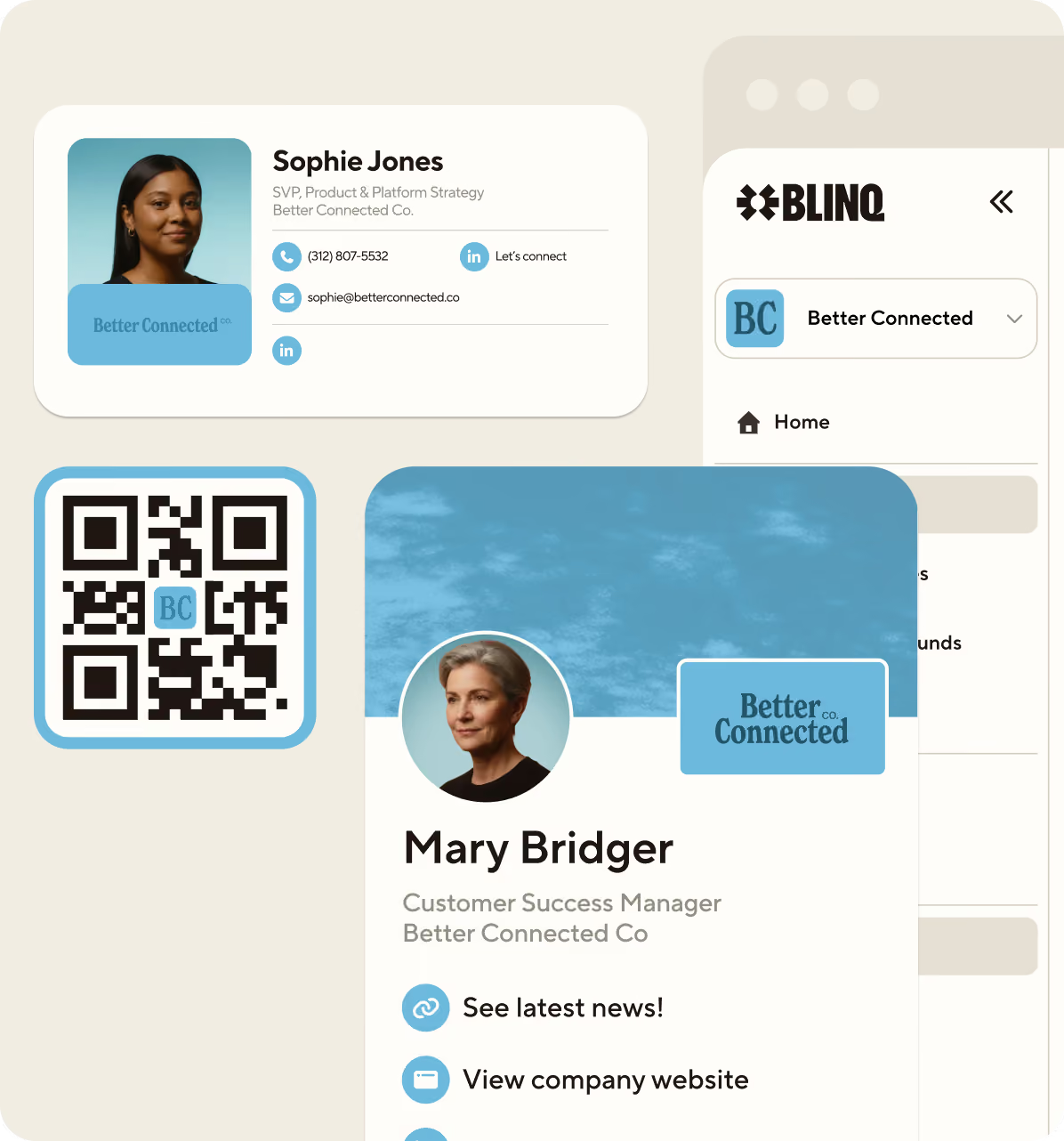
Blinq is the AI note taker built for conversations that happen in-person. If your work takes you to customer sites, trade show floors, networking events and phone calls, Blinq records from the phone already in your pocket (or your Apple Watch) and lets you link your notes to contacts. Blinq Business takes things further by letting you sync your contacts directly to your CRM.
Capture starts with a single tap in the app, on a smartwatch, or through a Bluetooth microphone. Phone calls are captured from the device itself. Blinq works offline, supports 99+ languages and records notes up to eight hours long. There is no meeting bot and no calendar integration required.
Blinq Business gives you even more, with CRM sync that covers Salesforce, HubSpot, Dynamics and Outlook with the contact record attached. When you capture a conversation with someone new, Blinq creates a contact in your CRM from the interaction, enriched with context from the conversation. Short notes (under five minutes) are always free, and ten long-form notes are included at no cost.
Because Blinq is built for in-person and phone conversations, it does not join video meetings. If your work is entirely video calls, the options below cover that ground.
Adoption is fast: no calendar integration and no IT setup. A user taps to start, and the note syncs to the CRM. Reliability in offline and noisy environments is a design priority - the app is built for trade show floors, busy lobbies, and on the go use. For teams evaluating a rollout, admin controls let an ops manager deploy without configuring calendar or bot permissions for each user.
Learn more about Blinq's AI Notetaker here.
2. Otter: Best for enterprise video meeting teams
Otter is the enterprise AI transcription platform with the longest track record in video meeting capture. If your team lives in Zoom, Teams or Google Meet and wants a mature system with enterprise-grade controls, Otter covers the most ground in that context.
Otter captures through three modes: a meeting bot that joins video calls, bot-free desktop and Chrome capture, and a mobile microphone for in-person recording. Phone call recording works only through Zoom Phone or RingCentral integrations, not from the native phone app. Transcription supports six languages: English, Spanish, French, German, Japanese and Chinese.
Pricing starts at $8.33 per month on an annual Pro plan, rising to $19.99 per month for Business. The free tier includes 300 minutes per month with a 30-minute per-conversation cap and three lifetime file imports.
CRM sync to Salesforce and HubSpot is gated by user count: Pro allows one CRM user, Business allows five, Enterprise removes the limit. Sync requires a calendar event with an external guest and an existing contact record. Otter describes this model as "enrich, not create." No new contact record is created from an Otter recording.
Onboarding involves calendar and CRM configuration before the tool is operational, which creates adoption friction for teams. Transcription accuracy drops with accents and uncommon languages given the six-language cap.
3. Fireflies: Best for teams that need wide integrations
Fireflies has the widest capture surface and the broadest CRM coverage of any AI note taker in this comparison. If your team uses multiple meeting platforms, phone systems and CRMs, Fireflies connects more of them than any other option.
Capture modes include a meeting bot, a Chrome extension, a desktop app, a mobile app for in-person recording, dialer integrations (Aircall, RingCentral, HubSpot Dialer), and API and file upload. This range means Fireflies can pick up audio from video calls, in-person conversations and phone calls across more channels than the other six tools.
The free tier offers unlimited transcription and AI summaries in 100+ languages, but the binding constraints are 400 minutes of storage per team and a capped number of AI credits. Those caps, not transcription, are what you hit first. Pro costs $10 per month annually ($18 monthly), Business $19 annually ($29 monthly), and Enterprise is $39 per month on annual plans only.
CRM sync is Pro tier and above, covering twelve CRMs. The HubSpot integration can create new contacts from meeting participants when the "Create meeting participant as a Contact" toggle is enabled. This is one of three tools in this comparison that creates CRM contacts, though it runs off calendar-event attendee emails on online meetings.
The wide integration surface adds onboarding complexity: configuring twelve CRM connections and multiple capture channels takes time. Multi-platform capture is generally reliable once configured.
4. Fathom: Best free option for video meetings
Fathom is the free-tier leader for video meeting transcription: unlimited recordings and unlimited transcription at zero cost, with no time caps and no trial expiration. If you want AI meeting notes without paying anything, Fathom is the strongest option for video calls.
Fathom's capture method is bot-free (currently in beta for video meetings), recording through desktop audio rather than joining as a meeting participant. The domain fathom.video now redirects to fathom.ai. A new iPhone app (released 17 August 2026, App Store id6751613402) adds in-person capture for iOS users. The app is version 1.0 with no ratings and no Android equivalent, so mobile capture is brand new and unproven at this stage.
Paid plans start at $16 per month annually for Premium ($20 monthly), with Team at $15 per seat and Business at $25 per seat. CRM sync to HubSpot and Salesforce pushes summaries into existing matched records only. Fathom does not connect to Leads in Salesforce and does not create new contact records. CRM sync is capped at three users per domain below the Business tier.
Fathom's desktop experience is polished and adoption friction is low for video-only use. Bot-free capture is still in beta, and the brand-new mobile app has no track record to evaluate.
5. Granola: Best for bot-free meeting notes
Granola is the bot-free AI notepad for people who want meeting notes without a visible bot joining the call. If bot-free capture and multiplatform support are your priorities, Granola covers the widest device range in the bot-free category.
Granola runs on macOS, Windows, iOS, Android and Apple Watch. It captures through desktop audio on video calls and through the mobile app for in-person conversations. Phone call recording works for outbound calls only, per the App Store description. Inbound phone calls are not supported.
The free tier includes unlimited notes with a 30-day history window. Business plans cost $14 per user per month and add CRM integrations (HubSpot, Attio, Affinity, Notion, Slack, Zapier). There is no native Salesforce integration on the pricing page. Enterprise is $35 per user per month.
CRM sync is attach-only. Granola's own documentation states: "If no matching records are found, no data will be created in HubSpot." No new contact records are created from a Granola recording.
The "notepad" metaphor lowers adoption friction: the tool feels like a note-taking app rather than an enterprise recording system. Desktop-audio capture is reliable across platforms, though quality depends on microphone placement and background noise.
6. Plaud: Best dedicated hardware for in-person capture
Plaud is the only option in this comparison that requires you to buy a physical device. If you want a dedicated recorder with long battery life and local storage that does not rely on your phone's microphone, Plaud is the hardware option.
Plaud sells four devices: Note ($159), Note Pro ($159.99), NotePin ($159), and NotePin S ($151.99 on sale). All offer dual-mode capture for in-person conversations and phone calls. Phone recording uses a vibration conduction sensor with the device attached to the back of your phone. Battery life runs up to 30 hours, and 64 GB of local storage means recordings stay on the device until you sync.
Subscription pricing sits on top of the hardware cost. Starter is free at 300 transcription minutes per month. Pro costs $8.33 per month annually ($17.99 monthly). Unlimited costs $19.99 per month annually ($29.99 monthly).
Plaud has no native CRM integration. Zapier triggers fire when transcripts or summaries are generated, but you cannot trigger Plaud from other apps through Zapier. No contact records are created.
The hardware purchase ($159 minimum) and the need to carry a second device create adoption friction. Recording reliability in noisy environments depends on microphone placement for in-person mode and vibration conduction quality for phone calls.
7. tl;dv: Best for collaborative teams on video calls
tl;dv is the AI notetaker built for team collaboration on video calls. If your team needs unlimited free video recordings with built-in sharing, commenting and clip features, tl;dv is the strongest collaborative option.
tl;dv uses a meeting bot to record Zoom, Google Meet and Teams calls. The bot appearance is customizable on paid plans. A mobile app ("tl;dv Mobile: AI Notetaker") exists for in-person capture, though the help center describes it as "still in its early stage." Transcription supports 30+ languages.
The free tier includes unlimited video recordings and unlimited transcription, but AI-generated notes are capped at 10 meetings and Ask AI queries are capped at 10. Those caps are the real constraint on the free plan. Pro costs $18 per seat per month annually ($29 monthly), and Business is $29 annually ($39 monthly).
CRM sync is Pro tier and above. The HubSpot integration can create a new contact record when no existing match is found (lifecycle stage: Lead). Salesforce integration attaches Tasks to existing contacts but does not create new ones.
Collaboration features (shared clips, comments, tagging) are built into the product and lower adoption friction for teams that already share meeting recordings. Bot-join reliability is generally consistent across the three supported platforms.
What types of conversations can AI note takers capture?
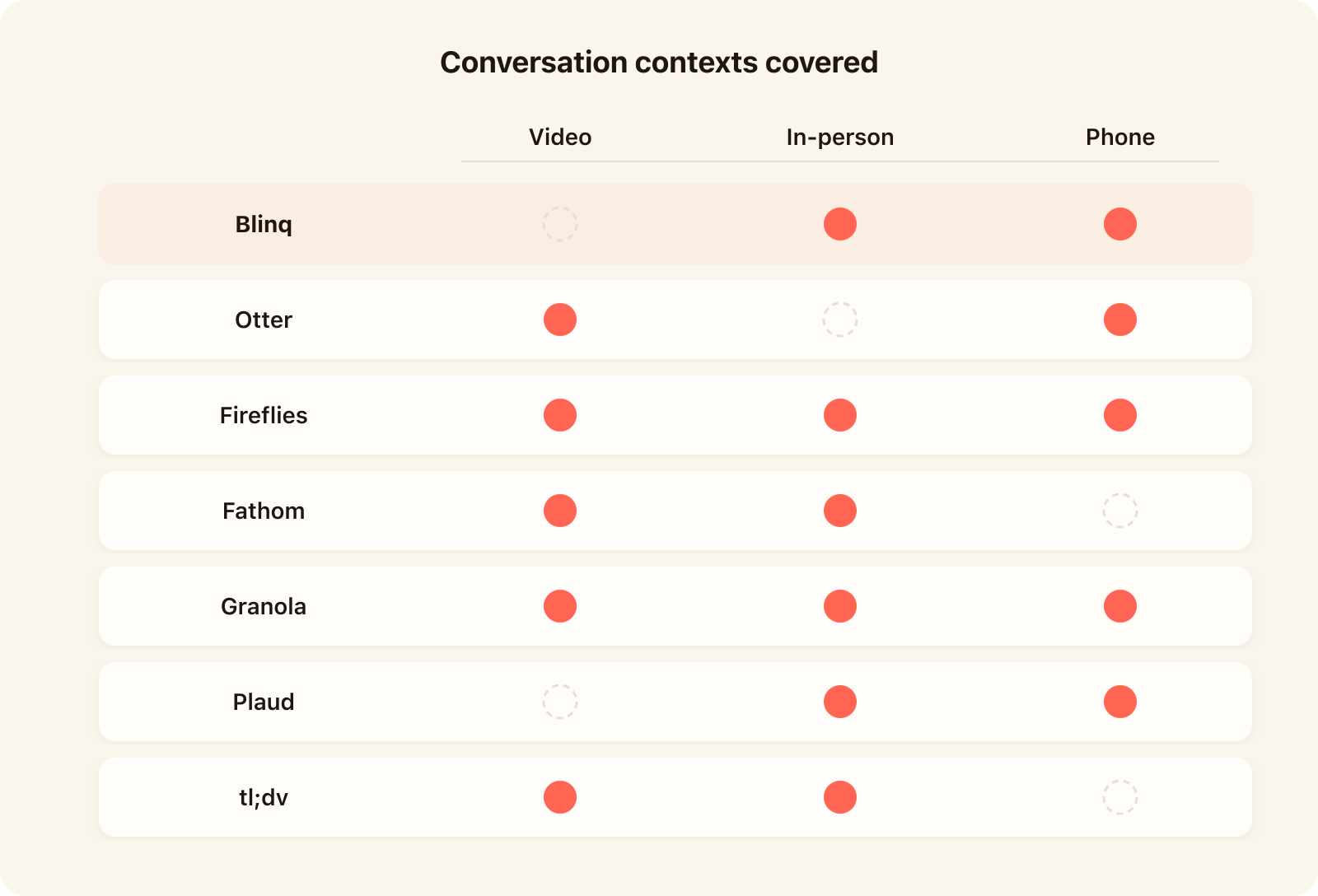
The decision that matters most when picking an AI note taker is where your conversations actually happen. A tool built for scheduled video calls will not help you at a customer site or on a phone queue. Video meetings, in-person conversations and phone calls each demand different capture methods, and no single tool covers all three equally well.
Video meetings
Video meetings are the home ground for most AI note takers, and the choice comes down to whether a bot joins the call as a visible participant or the tool records through your desktop audio. Meeting bots (Otter, Fireflies, tl;dv) appear in the participant list and record on your behalf. Bot-free tools (Granola, Fathom in beta) capture through desktop audio or a browser extension without joining. The distinction matters because video platforms have begun requiring hosts to manually admit participants they do not recognize. Google Meet introduced a default-deny guest queue in March 2026, requiring hosts to manually admit every unfamiliar participant. Bot-free capture avoids that friction entirely.
If your conversations happen outside video calls entirely, the in-person and phone options later in this list cover that ground, including capture from a smartwatch or Bluetooth microphone.
In-person conversations
In-person conversations have no calendar event, no dial-in link and no bot to send. You tap your phone, pair a smartwatch or connect a Bluetooth microphone, and the app records what it hears. Six of the seven tools support some form of in-person capture: Blinq records from your phone, smartwatch or Bluetooth mic; Fireflies and Granola capture through their mobile apps; Plaud uses a dedicated hardware device; tl;dv has an early-stage mobile app; and Fathom's new iPhone app (released August 2026) adds iOS-only capture. In-person recording raises consent questions: roughly 11 U.S. states require all-party consent, so disclose and ask before tapping start. This is the context where the CRM gap is widest: without a calendar event, most tools have no attendee email to match, and the recording sits disconnected from any contact record.
Phone calls
Phone call capture varies the most. Blinq and Plaud record from the device itself. Otter records calls through Zoom Phone and RingCentral integrations only, not from the native phone app. Granola captures outbound calls but not inbound. Fireflies picks up dialer audio through Aircall, RingCentral and HubSpot Dialer integrations. Fathom and tl;dv have no documented phone call support.
CRM sync and contact records: what each AI note taker actually writes
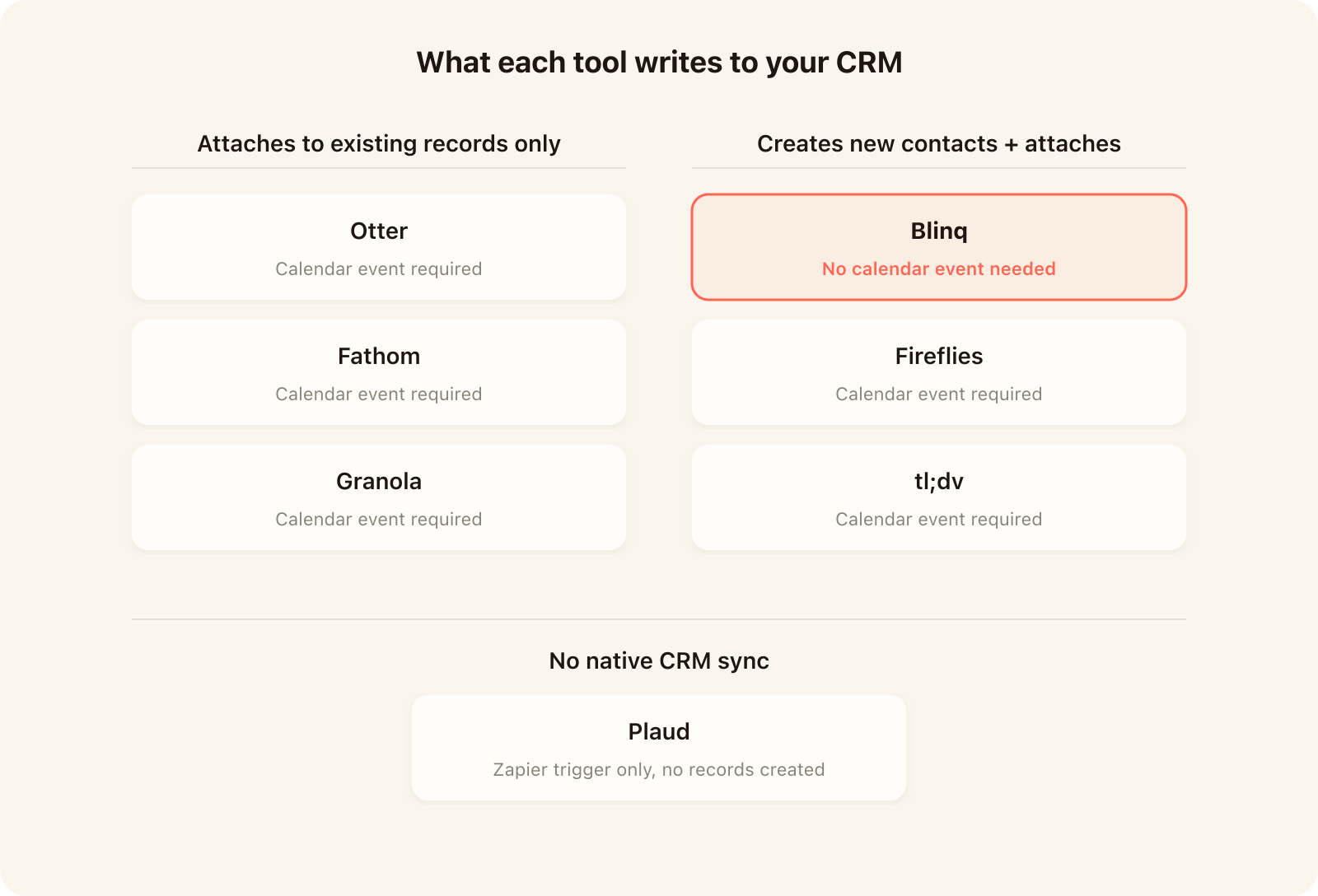
The phrase "CRM integration" appears on every AI note taker's feature page, but what each tool actually writes to your CRM varies widely. Some push a meeting summary to an existing record. A few create new contacts. Most require a calendar event to trigger the sync at all. The table below shows the difference.
Participant-based contact creation (Fireflies, tl;dv) runs off a calendar event's attendee emails on online meetings. Neither documents creating a contact from an ad-hoc in-person conversation with someone whose email you do not have yet. For CRM sync that starts from an in-person interaction rather than a calendar invite, Blinq is the only tool in this comparison that captures the person, enriches the record, and creates the contact without requiring a pre-existing entry or calendar event.
If you are rolling out a notetaker to a team, the CRM behavior above is the column that matters most. A tool that transcribes well but writes nothing to your CRM after a field visit creates work instead of removing it. Ask each vendor what happens to a recording that has no calendar event attached: that answer tells you whether the tool covers your in-person conversations or only your scheduled calls.
What you actually get on a free AI note taker plan
Every AI note taker in this comparison offers a free tier, but the binding constraint is rarely the number they headline. The table below shows what actually stops you on each free plan.
Fathom is the genuine free-tier leader for video meetings: unlimited recordings and transcription at $0 forever, with no time or storage caps. Fireflies and tl;dv both headline "unlimited" but gate the features that make the transcription useful (AI summaries, search, CRM sync) behind their paid tiers. Full pricing for each tool is on their respective websites.
Which AI note taker is right for you?
The right AI note taker depends on where you spend most of your working hours and what you need to happen after the conversation ends. Start with your primary context and work outward.
If you do a lot of in-person meetings or phone calls, Blinq is the way to go. Think first meetings with prospects, collaborating in the office, interviews, trade show conversations, networking events. For phone calls, sales reps, recruiters and outreach teams can capture every conversation without a calendar invite. Blinq records from your phone, smartwatch or Bluetooth microphone and creates a CRM contact from the person you spoke with.
If you spend most of your time in video meetings on one platform, Fathom gives you unlimited free recording with no bot joining the call. If your team needs collaboration features built around video recordings, tl;dv handles shared clips and comments out of the box.
If CRM sync is your top priority, compare Fireflies (twelve CRMs, broadest coverage) with Blinq (creates contacts from in-person conversations). If your video meetings span multiple platforms and you need CRM coverage across a wide tech stack, Fireflies connects to twelve CRMs and captures from more channels than any other option. If you want enterprise-grade transcription with mature admin controls, Otter is the longest-running platform in this category.
If you want bot-free video notes with a lightweight, notepad-style experience, Granola covers macOS, Windows, iOS, Android and Apple Watch without ever joining a call.
For readers who split their time between video and in-person, pairing a bot-free video tool (Fathom or Granola) with Blinq gives you coverage across both contexts.
If you want a dedicated hardware recorder that does not rely on your phone's microphone, Plaud is the only option with a standalone device.
If you are rolling out a notetaker to a team, the criteria that matter most are CRM sync depth, admin controls and per-seat cost. Blinq is the only tool that creates CRM contacts from in-person conversations without a calendar event, which matters if your team meets people outside of scheduled video calls. If your primary context is events and trade shows rather than daily conversations, see the roundup of event-specific lead capture tools.
FAQs
Are AI note takers legal?
AI note takers are legal to use in most jurisdictions, but recording consent requirements vary by location. Under U.S. federal law (18 U.S.C. 2511(2)(d)), one-party consent is sufficient. However, roughly 11 states require all-party consent, including California, Florida and Washington; Mayer Brown's June 2026 analysis counts 12 states. Outside the U.S., requirements vary by country. The safest practice: always disclose and obtain consent before you start recording.
What is the most accurate AI note taker?
AI notetaker accuracy cannot be ranked tool by tool because no independent benchmark compares consumer products head to head. All published figures are vendor-self-reported. The Open ASR (Automatic Speech Recognition) Leaderboard benchmarks speech recognition engines, not consumer products. The factors that affect accuracy most are audio quality, background noise, speaker accents and microphone distance. For the best results: use a close microphone, reduce background noise and test each tool with your own recordings before committing.
Should you get an AI note-taking app or a dedicated device?
AI note-taking apps and dedicated recording devices solve the same problem but with different trade-offs. An app runs on the phone already in your pocket with no extra cost and CRM integrations built in. A dedicated device (Plaud starts at $159) offers longer battery life and a purpose-built microphone but adds a second object to carry plus a subscription. Meta acquired Limitless in December 2025 and the Pendant is no longer sold to new customers, though existing users will be supported for at least another year. For most users, an app is the simpler path.
How do AI note takers handle privacy and data retention?
AI note takers store and process your conversation data differently. Most tools keep recordings in the cloud, though Plaud stores them on the device's 64 GB local storage until you sync. Retention policies vary: Granola's free plan auto-deletes notes after 30 days; others retain data until you delete it or your subscription ends. Before deploying any AI note taker to a team, check each vendor's privacy policy and confirm that the retention period meets your requirements.
Do Teams and Zoom have built-in AI note takers?
Teams and Zoom both include built-in AI note-taking features that work inside their own platforms, but they are platform features rather than standalone products. Microsoft Teams Copilot generates meeting summaries, action items and follow-ups for Teams meetings. Zoom AI Companion provides similar functionality for Zoom calls.
Both work only inside their own meeting environment. If your conversations span multiple platforms or happen outside video calls entirely (in-person meetings, phone calls, trade show conversations), a standalone AI note taker covers more ground. The seven tools in this comparison work across platforms and conversation types rather than being locked to one.